
CloudSkew is a free online diagram editor that helps you draw cloud architecture diagrams. CloudSkew diagrams can be securely saved to the cloud and icons for AWS, Microsoft Azure, Google Cloud Platform, Kubernetes, Alibaba Cloud, Oracle Cloud (OCI), and more are included.
CloudSkew is currently in public preview and the full list of features and capabilities can be seen here, as well as sample diagrams here. In this post, we’ll review CloudSkew’s building blocks, as well as discuss the lessons learned, key decisions, and trade-offs made in developing the editor.
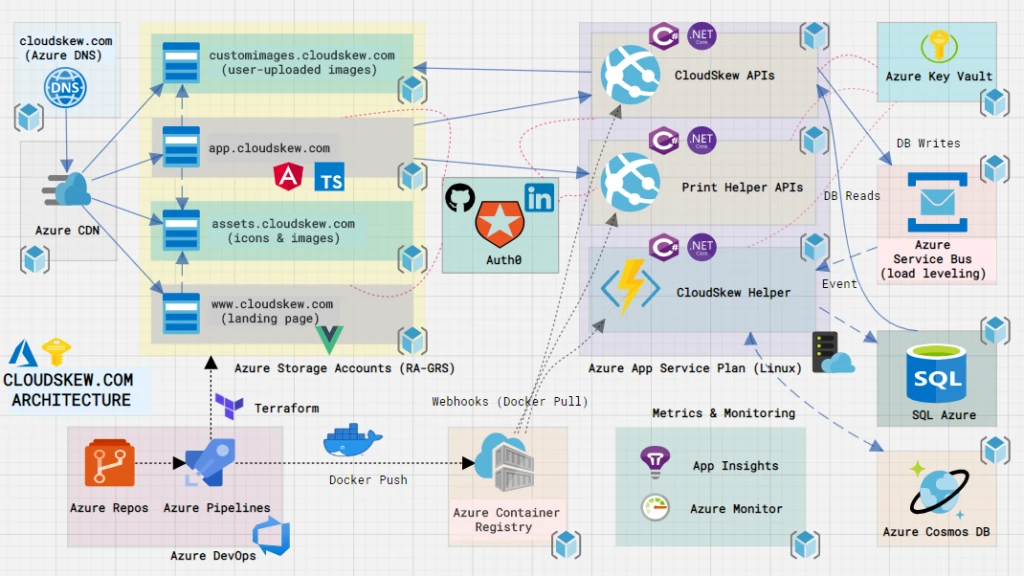
CloudSkew’s infrastructure is built on several Azure services, pieced together like LEGO blocks. Let’s review the individual components below.
Apps
At its core, CloudSkew’s front-end consists of two web apps:
- Landing page: static VuePress site, with all pages authored in Markdown. The default VuePress theme is used without any customization, although we’re loading some marketplace plugins for support image zoom, Google Analytics, sitemap, and more. All images on this site are loaded from a CDN. We chose VuePress for SSG primarily due to its simplicity.
- Diagram editor: an Angular 8 SPA written in TypeScript. To access the app, users login using GitHub or LinkedIn credentials. This app also loads all of its static assets from a CDN, while relying on the back-end web APIs for fetching dynamic content. The choice of Angular as the front-end framework was mainly driven by our familiarity with it from prior projects.
Web APIs
The back-end consists of two web API apps, both authored using ASP.NET Core 3.1:
- CloudSkew APIs facilitate CRUD operations over diagrams, diagram templates, and user profiles.
- DiagramHelper APIs are required for printing or exporting (as PNG/JPG) diagrams. These APIs are isolated in a separate app since the memory footprint is higher, causing the process to recycle more often.
Using ASP.NET Core’s middleware, we ensure that:
- JWT authentication is enforced. Use of policy-based authorization for RBAC ensures that claims mapping to user permissions are present in the JWT.
- Only the diagram editor (front-end app) can invoke these APIs (CORS settings).
- Brotli response compression is enabled for reducing payload sizes.
The web APIs are stateless and operate under the assumption that they can be restarted or redeployed any time. No sticky sessions and affinities, no in-memory state, and all state is persisted to databases using EF Core (an ORM).
Separate DTO/REST and DBContext/SQL models are maintained for all entities, with AutoMapper rules being used for conversions between the two.
Identity, AuthN, and AuthZ
Auth0 is used as the (OIDC compliant) identity platform for CloudSkew. Users can login via GitHub or LinkedIn. The handshake with these identity providers is managed by Auth0 itself. Using implicit flow, ID, and access tokens (JWTs) are granted to the diagram editor app. The Auth0.JS SDK makes all this very easy to implement. All calls to the back-end web APIs use the access token as the bearer.
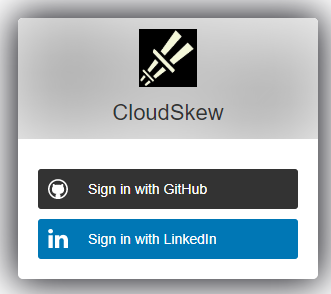
Auth0 creates and maintains the user profiles for all signed-up users. Authorization/RBAC is managed by assigning Auth0 roles to these user profiles. Each role contains a collection of permissions that can be assigned to the users (they show up as custom claims in the JWTs).
Auth0 rules are used to inject custom claims in the JWT and whitelist/blacklist users.
Databases
Azure SQL Database is used for persisting user data, primarily for Diagram, DiagramTemplate, and UserProfile. User credentials are not stored in CloudSkew’s database (that part is handled by Auth0). User contact details like emails are MD5 hashed.
Because of CloudSkew’s auto-save feature, updates to the Diagram table happens very frequently. Some steps have been taken to optimize this:
- Debouncing the auto-save requests from the diagram editor UI to the Web API.
- Use of a queue for load-leveling the update requests (see this section for details).
For the preview version, the Azure SQL SKU being used in production is Standard/S0 with 20 DTUs (single database). Currently, the database is only available in one region. Auto-failover groups and active geo-replication (read-replicas) are not currently being used.
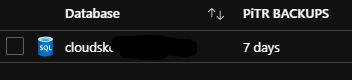
Azure SQL’s built-in geo-redundant database backups offer weekly full database backups, differential DB backups every 12 hours, and transaction log backups every five to 10 minutes. Azure SQL internally stores the backups in RA-GRS storage for seven days. RTO is 12 hours and RPO is 1 hour. Perhaps less than ideal, but we’ll look to improve this once CloudSkew’s usage grows.
Azure CosmosDB‘s usage is purely experimental at this point, mainly for the analysis of anonymized, read-only user data in graph format over gremlin APIs. Technically speaking, this database can be removed without any impact to user-facing features.
Hosting and storage
Two Azure Storage Accounts are provisioned for hosting the front-end apps: landing page and diagram editor. The apps are served via the $web blob containers for static sites.
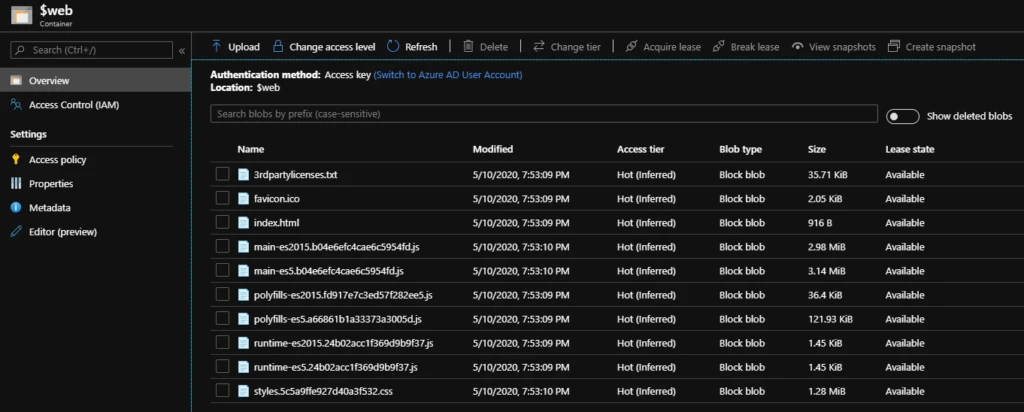
Two more storage accounts are provisioned for serving the static content (mostly icon SVGs) and user-uploaded images (PNG, JPG files) as blobs.
Two Azure App Services on Linux are also provisioned for hosting the containerized back-end web APIs. Both app services share the same App Service Plan
- For CloudSkew’s preview version we’re using the
B1 (100 ACU, 1.75 GB Mem)plan, which don’t include automatic horizontal scale-outs, which are scale-outs that need to be done manually). - Managed Identity is enabled for both app services, required for accessing the Key Vault.
- The
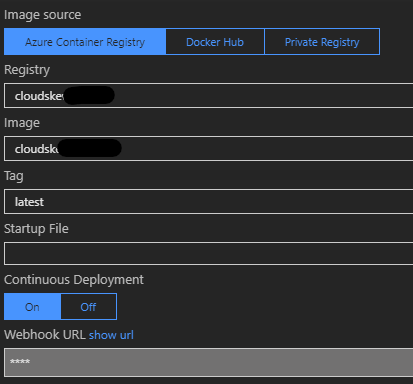
Always Onsettings have been enabled. - An Azure Container Registry is also provisioned. The deployment pipeline packages the API apps as Docker images and pushes to the container registry. The App Services pull from it (using webhook notifications).
Caching and compression
An Azure CDN profile is provisioned with four endpoints, the first two using the hosted front-end apps (landing page and diagram editor) as origins and the other two pointing to the storage accounts (for icon SVGs and user-uploaded images).
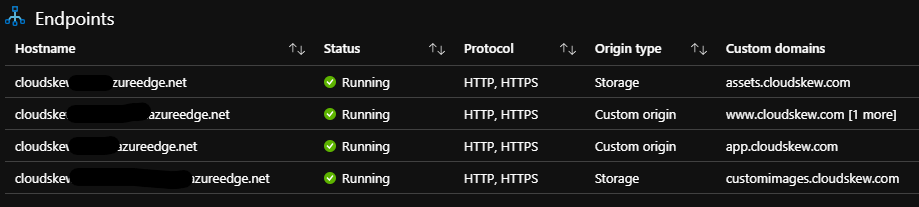
In addition to caching at global POPs, content compression at POPs is also enabled.
Subdomains and DNS records
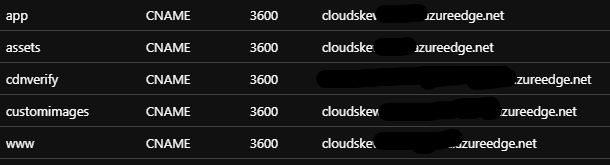
All CDN endpoints have <subdomain>.cloudskew.com custom domain hostnames enabled on them. This is facilitated by using Azure DNS to create CNAME records that map <subdomain>.cloudskew.com to their CDN endpoint counterparts.
HTTPS and TLS certificates
Custom domain HTTPS is enabled and the TLS certificates are managed by Azure CDN itself. HTTP-to-HTTPS redirection is also enforced via CDN rules.
Externalized configuration and self-bootstrapping
Azure Key Vault is used as a secure, external, central key-value store. This helps decouple back-end web API apps from their configuration settings.
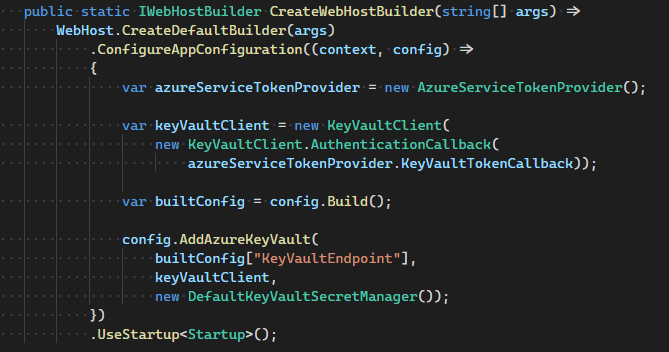
The web API apps have managed identities, which are RBAC’ed for Key Vault access. Also, the web API apps self-bootstrap by reading their configuration settings from the Key Vault at startup. The handshake with the Key Vault is facilitated using the Key Vault Configuration Provider.
Queue-based load leveling
Even after debouncing calls to the API, the volume of PUT (UPDATE) requests generated by auto-save feature causes the Azure SQL Database’s DTU consumption to spike, resulting in service degradation. To smooth out this burst of requests, an Azure Service Bus is used as an intermediate buffer. Instead of writing directly to the database, the web API instead queues up all PUT requests into the service bus to be drained asynchronously later.
An Azure Function app is responsible for serially dequeuing the brokered messages off the service bus, using the service bus trigger. Once the function receives a peek-locked message, it commits the PUT (UPDATE) to the Azure SQL database. If the function fails to process any messages, the messages automatically get pushed onto the service bus’s dead-letter queue. When this happens, an Azure monitor alert is triggered.
The Azure Function app shares the same app service plan as the back-end web APIs, using the dedicated app service plan instead of the regular consumption plan. Overall this queue-based load-leveling pattern has helped plateau the database load.
Application performance management
The Application Insights SDK is used by the diagram editor (front-end Angular SPA) as an extensible Application Performance Management (APM) to better understand user needs. For example, we’re interested in tracking the names of icons that the users couldn’t find in the icon palette (via the icon search box). This helps us add frequently-searched icons in the future.
App Insight’s custom events help us log the data and KQL queries are used to mine the aggregated data. The App Insight SDK is also used for logging traces. The log verbosity is configured via app config (externalized config using Azure Key Vault).
Infrastructure monitoring
Azure Portal Dashboards are used to visualize metrics from the various Azure resources deployed by CloudSkew.
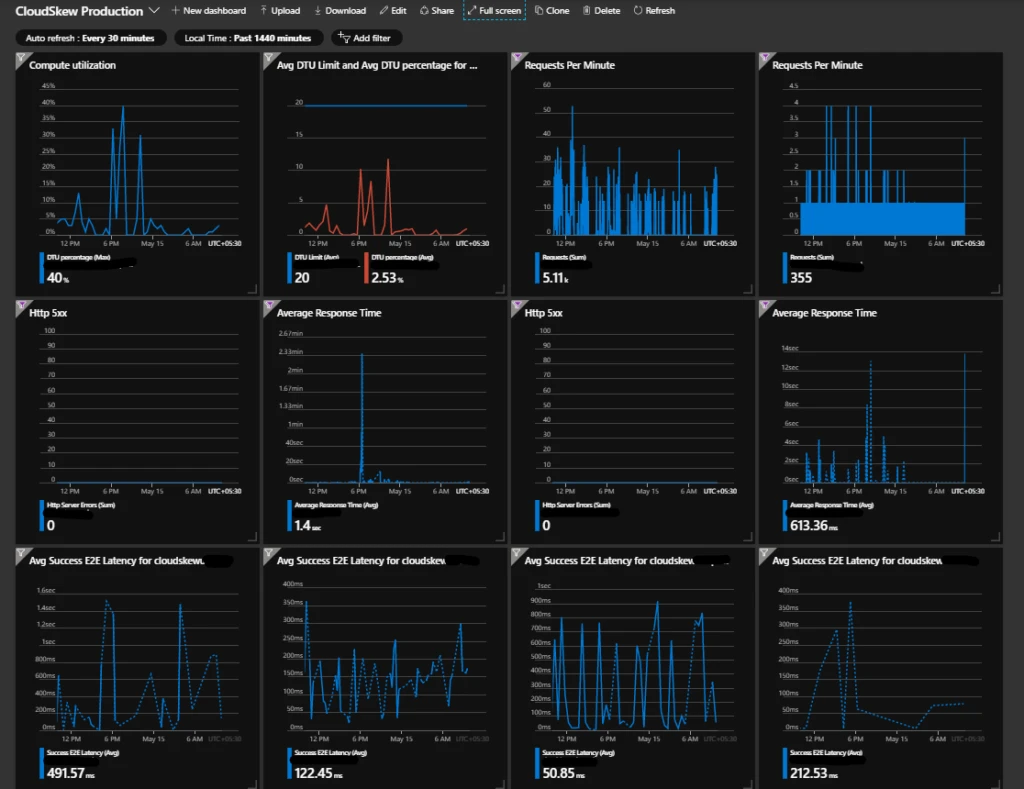
Incident management
Azure Monitor’s metric-based alerts are being used to get incident notifications over email and Slack. Some examples of conditions that trigger alerts:
- [Sev 0] 5xx errors in the web APIs required for printing/exporting diagrams.
- [Sev 1] 5xx errors in other CloudSkew web APIs.
- [Sev 1] Any messages in the Service Bus dead-letter queue.
- [Sev 2] Response time of web APIs crossing specified thresholds.
- [Sev 2] Spikes in DTU consumption in Azure SQL databases.
- [Sev 3] Spikes in E2E latency for blob storage requests.
Metrics are evaluated and sampled at 15-minute frequency with 1-hour aggregation windows.
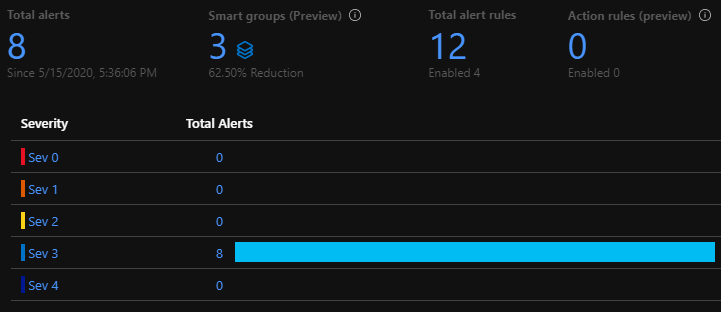
Note: Currently, 100% of the incoming metrics are sampled. Over time, as usage grows, we’ll start filtering out outliers at P99.
Resource provisioning
Terraform scripts are used to provision all of the Azure resources and services shown in the architecture diagram (e.g., storage accounts, app services, CDN, DNS zone, container registry, functions, SLQ server, service bus). Use of Terraform allows us to easily achieve parity in development, test, production environments. Although these three environments are mostly identical clones of each other, there are minor differences:
- Across the dev, test, and production environments, the app configuration data stored in the Key Vaults will have the same key names, but different values. This helps apps to bootstrap accordingly.
- The dev environments are ephemeral, created on demand and are disposed when not in use.
- For cost reasons, smaller resource SKUs are used in dev and test environments. For example, Basic/B 5 DTUs Azure SQLs in the test environment as compared to Standard/S0 20 DTU in production.
Note: The Auth0 tenant has been set up manually since there are no terraform providers for it. However it looks like it might be possible to automate the provisioning using Auth0’s Deploy CLI.
Note: CloudSkew’s provisioning script are being migrated from terraform to pulumi . This article will be updated as soon as the migration is complete.
Continuous integration
The source code is split across multiple private Azure Repos. The “one repository per app” rule of thumb is applied here. An app is deployed to dev, test, and production prod environments from the same repo.
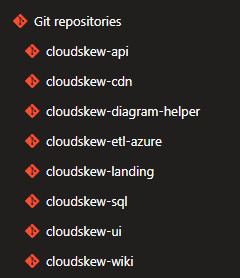
Feature development and bug fixes happen in private or feature branches, which are ultimately merged into master branches via pull requests.
Azure Pipelines are used for continuous integration (CI). Check-ins are built, unit tested, packaged, and deployed to the test environment. CI pipelines are automatically triggered both on pull request creation, as well as check-ins to master branches.
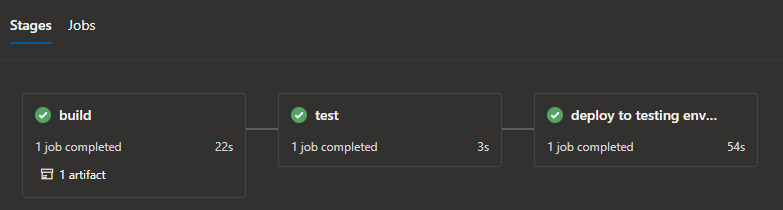
The pipelines are authored in YAML and executed on Microsoft-hosted Ubuntu agents.
Azure Pipelines’ built-in tasks are heavily leveraged for deploying changes to Azure app services, functions, storage accounts, container registry, etc. Access to azure resource is authorized via service connections.
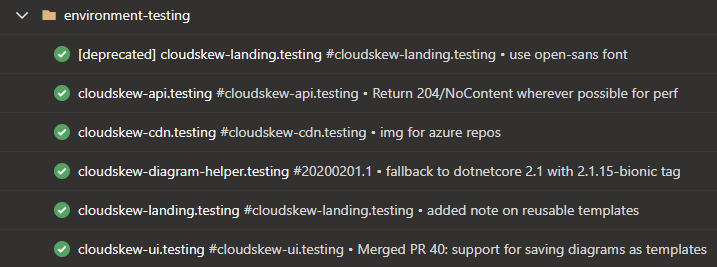
Deployment and release
The deployment and release process is very simple (blue-green deployments, canary deployments, and feature flags are not being used). Check-ins that pass the CI process become eligible for release to the production environment.
Azure Pipelines deployment jobs are used to target the releases to production environments.
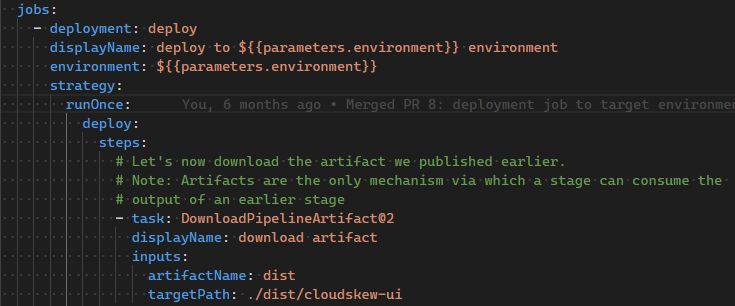
Manual approvals are used to authorize the releases.

Future architectural changes
As more features are added and usage grows, some architectural enhancements will be evaluated:
- HA with multi-regional deployments and using Traffic Manager for routing traffic.
- Move to a higher App Service SKU to avail of slot swapping, horizontal auto-scaling, etc.
- Use of caching in the back-end (Azure Cache for Redis, ASP.NET’s IMemoryCache).
- Changes to the deployment and release model with blue-green deployments and adoption of feature flags.
- PowerBI/Grafana dashboard for tracking business KPIs.
Again, any of these enhancements will ultimately be need-driven.
In conclusion
CloudSkew is in very early stages of development and here are the basic guidelines:
- PaaS/serverless over IaaS: Pay as-you-go, no server management overhead, which is also why Kubernetes clusters are not in scope yet.
- Microservices over monoliths: Individual LEGO blocks can be independently deployed and scaled up or out.
- Always keeping the infrastructure stable: Everything infra-related is automated: from provisioning to scaling to monitoring. An “it just works” infrastructure helps maintain the core focus on user-facing features.
- Frequent releases: The goal is to rapidly go from idea -> development -> deployment -> release. Having ultra-simple CI, deployment, and release processes go a long way to achieving this.
- No premature optimization: All changes for making things more “efficient” is done just-in-time and must be need-driven. For example, Redis cache is currently not required at the back-end since API response times are within acceptable thresholds.
Please email us with questions, comments, or suggestions about the project. You can also find a video version of this overview here. Happy diagramming!
