
Improving performance of HTTP was one the key design goals for the HTTP/1.1 working group, and the standard introduced a large number of critical performance enhancements and features. A few of the best known include the following:
- Persistent connections to allow connection reuse
- Chunked transfer encoding to allow response streaming
- Request pipelining to allow parallel request processing
- Byte serving to allow range-based resource requests
- Improved and much better-specified caching mechanisms
This list is incomplete, and a full discussion of the technical details of each and every HTTP/1.1 enhancement deserves a separate book. Once again, check out HTTP: The Definitive Guide by David Gourley and Brian Totty. Similarly, speaking of good reference books, Steve Souders’ High Performance Web Sites offers great advice in the form of 14 rules, half of which are networking optimizations:
- Reduce DNS lookups
- Every hostname resolution requires a network roundtrip, imposing latency on the request and blocking the request while the lookup is in progress.
- Make fewer HTTP requests
- No request is faster than a request not made: eliminate unnecessary resources on your pages.
- Use a Content Delivery Network
- Locating the data geographically closer to the client can significantly reduce the network latency of every TCP connection and improve throughput.
- Add an Expires header and configure ETags
- Relevant resources should be cached to avoid re-requesting the same bytes on each and every page. An Expires header can be used to specify the cache lifetime of the object, allowing it to be retrieved directly from the user’s cache and eliminating the HTTP request entirely. ETags and Last-Modified headers provide an efficient cache revalidation mechanism—effectively a fingerprint or a timestamp of the last update.
- Gzip assets
- All text-based assets should be compressed with Gzip when transferred between the client and the server. On average, Gzip will reduce the file size by 60–80%, which makes it one of the simpler (configuration flag on the server) and high-benefit optimizations you can do.
- Avoid HTTP redirects
- HTTP redirects can be extremely costly, especially when they redirect the client to a different hostname, which results in additional DNS lookup, TCP connection latency, and so on.
Each of the preceding recommendations has stood the test of time and is as true today as when the book was first published in 2007. That is no coincidence, because all of them highlight two fundamental recommendations: eliminate and reduce unnecessary network latency, and minimize the amount of transferred bytes. Both are evergreen optimizations, which will always ring true for any application.
However, the same can’t be said for all HTTP/1.1 features and best practices. Unfortunately, some HTTP/1.1 features, like request pipelining, have effectively failed due to lack of support, and other protocol limitations, such as head-of-line response blocking, created further cracks in the foundation. In turn, the web developer community—always an inventive lot—has created and popularized a number of homebrew optimizations: domain sharding, concatenation, spriting, and inlining among dozens of others.
For many web developers, all of these are matter-of-fact optimizations: familiar, necessary, and universally accepted. However, in reality, these techniques should be seen for what they really are: stopgap workarounds for existing limitations in the HTTP/1.1 protocol. We shouldn’t have to worry about concatenating files, spriting images, sharding domains, or inlining assets. Unfortunately, “shouldn’t” is not a pragmatic stance to take: these optimizations exist for good reasons, and we have to rely on them until the underlying issues are fixed in the next revision of the protocol.
§Benefits of Keepalive Connections
One of the primary performance improvements of HTTP/1.1 was the introduction of persistent or keepalive HTTP connections—both names refer to the same feature. We saw keepalive in action in HTTP/1.1: Internet Standard, but let’s illustrate why this feature is such a critical component of our performance strategy.
To keep things simple, let’s restrict ourselves to a maximum of one TCP connection and examine the scenario (Figure 11-1) where we need to fetch just two small (<4 KB each) resources: an HTML document and a supporting CSS file, each taking some arbitrary amount of time on the server (40 and 20 ms, respectively).
Figure 11-1 assumes the same 28 milliseconds one-way “light in fiber” delay between New York and London as used in previous TCP connection establishment examples; see Table 1-1.
Each TCP connection begins with a TCP three-way handshake, which takes a full roundtrip of latency between the client and the server. Following that, we will incur a minimum of another roundtrip of latency due to the two-way propagation delay of the HTTP request and response. Finally, we have to add the server processing time to get the total time for every request.
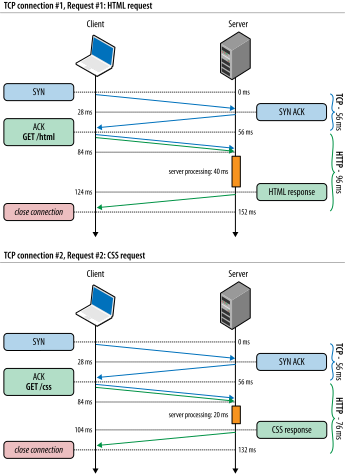
We cannot predict the server processing time, since that will vary by resource and the back-end behind it, but it is worth highlighting that the minimum total time for an HTTP request delivered via a new TCP connection is two network roundtrips: one for the handshake, one for the request-response cycle. This is a fixed cost imposed on all non-persistent HTTP sessions.
The faster your server processing time, the higher the impact of the fixed latency overhead of every network request! To prove this, try changing the roundtrip and server times in the previous example.
Hence, a simple optimization is to reuse the underlying connection! Adding support for HTTP keepalive (Figure 11-2) allows us to eliminate the second TCP three-way handshake, avoid another round of TCP slow-start, and save a full roundtrip of network latency.
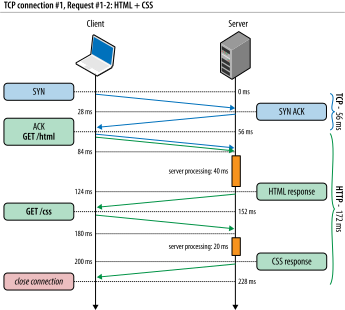
In our example with two requests, the total savings is just a single roundtrip of latency, but let’s now consider the general case with a single TCP connection and N HTTP requests:
- Without keepalive, each request will incur two roundtrips of latency.
- With Keepalive, the first request incurs two roundtrips, and all following requests incur just one roundtrip of latency.
The total latency savings for N requests is (N–1) × RTT when connection keepalive is enabled. Finally, recall that the average value of N is 90 resources and growing (Anatomy of a Modern Web Application), and we quickly arrive at potential latency savings measured in seconds! Needless to say, persistent HTTP is a critical optimization for every web application.
HTTP Pipelining
Persistent HTTP allows us to reuse an existing connection between multiple application requests, but it implies a strict first in, first out (FIFO) queuing order on the client: dispatch request, wait for the full response, dispatch next request from the client queue. HTTP pipelining is a small but important optimization to this workflow, which allows us to relocate the FIFO queue from the client (request queuing) to the server (response queuing).
To understand why this is beneficial, let’s revisit Figure 11-2. First, observe that once the first request is processed by the server, there is an entire roundtrip of latency—response propagation latency, followed by request propagation latency—during which the server is idle. Instead, what if the server could begin processing the second request immediately after it finished the first one? Or, even better, perhaps it could even process both in parallel, on multiple threads, or with the help of multiple workers.
By dispatching our requests early, without blocking on each individual response, we can eliminate another full roundtrip of network latency, taking us from two roundtrips per request with no connection keepalive, down to two network roundtrips (Figure 11-3) of latency overhead for the entire queue of requests!
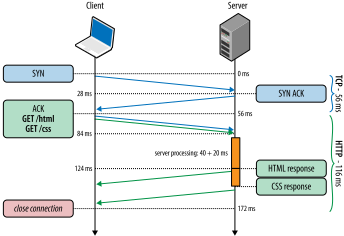
Eliminating the wait time imposed by response and request propagation latencies is one of the primary benefits of HTTP/1.1 pipelining. However, the ability to process the requests in parallel can have just as big, if not bigger, impact on the performance of your application.
At this point, let’s pause and revisit our performance gains so far. We began with two distinct TCP connections for each request (Figure 11-1), which resulted in 284 milliseconds of total latency. With keepalive enabled (Figure 11-2), we were able to eliminate an extra handshake roundtrip, bringing the total down to 228 milliseconds. Finally, with HTTP pipelining in place, we eliminated another network roundtrip in between requests. Hence, we went from 284 milliseconds down to 172 milliseconds, a 40% reduction in total latency, all through simple protocol optimization.
Further, note that the 40% improvement is not a fixed performance gain. This number is specific to our chosen network latencies and the two requests in our example. As an exercise for the reader, try a few additional scenarios with higher latencies and more requests. You may be surprised to discover that the savings can be much, much larger. In fact, the larger the network latency, and the more requests, the higher the savings. It is worth proving to yourself that this is indeed the case! Ergo, the larger the application, the larger the impact of networking optimization.
However, we are not done yet. The eagle-eyed among you have likely spotted another opportunity for optimization: parallel request processing on the server. In theory, there is no reason why the server could not have processed both pipelined requests (Figure 11-3) in parallel, eliminating another 20 milliseconds of latency.
Unfortunately, this optimization introduces a lot of subtle implications and illustrates an important limitation of the HTTP/1.x protocol: strict serialization of returned responses. Specifically, HTTP/1.x does not allow data from multiple responses to be interleaved (multiplexed) on the same connection, forcing each response to be returned in full before the bytes for the next response can be transferred. To illustrate this in action, let’s consider the case (Figure 11-4) where the server processes both of our requests in parallel.
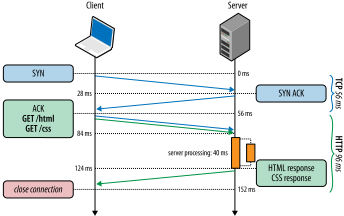
Figure 11-4 demonstrates the following:
- Both HTML and CSS requests arrive in parallel, but HTML request is first.
- Server begins processing both in parallel. HTML: 40 ms, CSS: 20 ms.
- CSS request completes first but must be buffered until HTML response is sent.
- Once HTML response is sent, CSS response is flushed from the server buffers.
Even though the client issued both requests in parallel, and the CSS resource is available first, the server must wait to send the full HTML response before it can proceed with delivery of the CSS asset. This scenario is commonly known as head-of-line blocking and results in suboptimal delivery: underutilized network links, server buffering costs, and worst of all, unpredictable latency delays for the client. What if the first request hangs indefinitely or simply takes a very long time to generate on the server? With HTTP/1.1, all requests behind it are blocked and have to wait.
We have already encountered head-of-line blocking when discussing TCP: due to the requirement for strict in-order delivery, a lost TCP packet will block all packets with higher sequence numbers until it is retransmitted, inducing extra application latency; see TCP Head-of-Line Blocking.
In practice, due to lack of multiplexing, HTTP pipelining creates many subtle and undocumented implications for HTTP servers, intermediaries, and clients:
- A single slow response blocks all requests behind it.
- When processing in parallel, servers must buffer pipelined responses, which may exhaust server resources—e.g., what if one of the responses is very large? This exposes an attack vector against the server!
- A failed response may terminate the TCP connection, forcing the client to re-request all the subsequent resources, which may cause duplicate processing.
- Detecting pipelining compatibility reliably, where intermediaries may be present, is a nontrivial problem.
- Some intermediaries do not support pipelining and may abort the connection, while others may serialize all requests.
Due to these and similar complications, and lack of guidance in the HTTP/1.1 standard for these cases, HTTP pipelining adoption has remained very limited despite its many benefits. Today, some browsers support pipelining, usually as an advanced configuration option, but most have it disabled. In other words, if the web browser is the primary delivery vehicle for your web application, then we can’t count on HTTP pipelining to help with performance.
Using Multiple TCP Connections
In absence of multiplexing in HTTP/1.x, the browser could naively queue all HTTP requests on the client, sending one after another over a single, persistent connection. However, in practice, this is too slow. Hence, the browser vendors are left with no other choice than to open multiple TCP sessions in parallel. How many? In practice, most modern browsers, both desktop and mobile, open up to six connections per host.
Before we go any further, it is worth contemplating the implications, both positive and negative, of opening multiple TCP connections in parallel. Let’s consider the maximum case with six independent connections per host:
- The client can dispatch up to six requests in parallel.
- The server can process up to six requests in parallel.
- The cumulative number of packets that can be sent in the first roundtrip (TCP cwnd) is increased by a factor of six.
The maximum request parallelism, in absence of pipelining, is the same as the number of open connections. Further, the TCP congestion window is also effectively multiplied by the number of open connections, allowing the client to circumvent the configured packet limit dictated by TCP slow-start. So far, this seems like a convenient workaround! However, let’s now consider some of the costs:
- Additional sockets consuming resources on the client, server, and all intermediaries: extra memory buffers and CPU overhead
- Competition for shared bandwidth between parallel TCP streams
- Much higher implementation complexity for handling collections of sockets
- Limited application parallelism even in light of parallel TCP streams
In practice, the CPU and memory costs are nontrivial, resulting in much higher per-client overhead on both client and server—higher operational costs. Similarly, we raise the implementation complexity on the client—higher development costs. Finally, this approach still delivers only limited benefits as far as application parallelism is concerned. It’s not the right long-term solution. Having said that, there are three valid reasons why we have to use it today:
- As a workaround for limitations of the application protocol (HTTP)
- As a workaround for low starting congestion window size in TCP
- As a workaround for clients that cannot use TCP window scaling (see Bandwidth-Delay Product)
Both TCP considerations (window scaling and cwnd) are best addressed by a simple upgrade to the latest OS kernel release; see Optimizing for TCP. The cwnd value has been recently raised to 10 packets, and all the latest platforms provide robust support for TCP window scaling. That’s the good news. The bad news is there is no simple workaround for fixing multiplexing in HTTP/1.x.
As long as we need to support HTTP/1.x clients, we are stuck with having to juggle multiple TCP streams. Which brings us to the next obvious question: why and how did the browsers settle on six connections per host? Unfortunately, as you may have guessed, the number is based on a collection of trade-offs: the higher the limit, the higher the client and server overhead, but at the additional benefit of higher request parallelism. Six connections per host is simply a safe middle ground. For some sites, this may provide great results; for many it is insufficient.
Domain Sharding
A gap in the HTTP/1.X protocol has forced browser vendors to introduce and maintain a connection pool of up to six TCP streams per host. The good news is all of the connection management is handled by the browser itself. As an application developer, you don’t have to modify your application at all. The bad news is six parallel streams may still not be enough for your application.
According to HTTP Archive, an average page is now composed of 90+ individual resources, which if delivered all by the same host would still result in significant queuing delays (Figure 11-5). Hence, why limit ourselves to the same host? Instead of serving all resources from the same origin (e.g., www.example.com), we can manually “shard” them across multiple subdomains: {shard1, shardn}.example.com. Because the hostnames are different, we are implicitly increasing the browser’s connection limit to achieve a higher level of parallelism. The more shards we use, the higher the parallelism!
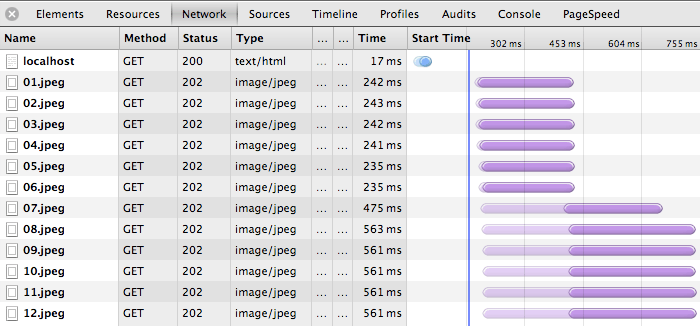
Of course, there is no free lunch, and domain sharding is not an exception: every new hostname will require an additional DNS lookup, consume additional resources on both sides for each additional socket, and, worst of all, require the site author to manually manage where and how the resources are split.
In practice, it is not uncommon to have multiple hostnames (e.g., shard1.example.com, shard2.example.com) resolve to the same IP address. The shards are CNAME DNS records pointing to the same server, and browser connection limits are enforced with respect to the hostname, not the IP. Alternatively, the shards could point to a CDN or any other reachable server.
What is the formula for the optimal number of shards? Trick question, as there is no such simple equation. The answer depends on the number of resources on the page (which varies per page) and the available bandwidth and latency of the client’s connection (which varies per client). Hence, the best we can do is make an informed guess and use some fixed number of shards. With luck, the added complexity will translate to a net win for most clients.
In practice, domain sharding is often overused, resulting in tens of underutilized TCP streams, many of them never escaping TCP slow-start, and in the worst case, actually slowing down the user experience. Further, the costs are even higher when HTTPS must be used, due to the extra network roundtrips incurred by the TLS handshake. A few considerations to keep in mind:
- Get the most out of TCP first; see Optimizing for TCP.
- The browser will automatically open up to six connections on your behalf.
- Number, size, and response time of each resource will affect the optimal number of shards.
- Client latency and bandwidth will affect the optimal number of shards.
- Domain sharding can hurt performance due to additional DNS lookups and TCP slow-start.
Domain sharding is a legitimate but also an imperfect optimization. Always begin with the minimum number of shards (none), and then carefully increase the number and measure the impact on your application metrics. In practice, very few sites actually benefit from more than a dozen connections, and if you do find yourself at the top end of that range, then you may see a much larger benefit by reducing the number of resources or consolidating them into fewer requests.
The extra overhead of DNS lookups and TCP slow-start affects high-latency clients the most, which means that mobile (3G and 4G) clients are often affected the most by overzealous use of domain sharding!
Measuring and Controlling Protocol Overhead
HTTP 0.9 started with a simple, one-line ASCII request to fetch a hypertext document, which incurred minimal overhead. HTTP/1.0 extended the protocol by adding the notion of request and response headers to allow both sides to exchange additional request and response metadata. Finally, HTTP/1.1 made this format a standard: headers are easily extensible by any server or client and are always sent as plain text to remain compatible with previous versions of HTTP.
Today, each browser-initiated HTTP request will carry an additional 500–800 bytes of HTTP metadata: user-agent string, accept and transfer headers that rarely change, caching directives, and so on. Even worse, the 500–800 bytes is optimistic, since it omits the largest offender: HTTP cookies, which are now commonly used for session management, personalization, analytics, and more. Combined, all of this uncompressed HTTP metadata can, and often does, add up to multiple kilobytes of protocol overhead for each and every HTTP request.
RFC 2616 (HTTP/1.1) does not define any limit on the size of the HTTP headers. However, in practice, many servers and proxies will try to enforce either an 8 KB or a 16 KB limit.
The growing list of HTTP headers is not bad in and of itself, as most headers exist for a good reason. However, the fact that all HTTP headers are transferred in plain text (without any compression), can lead to high overhead costs for each and every request, which can be a serious bottleneck for some applications. For example, the rise of API-driven web applications, which frequently communicate with compact serialized messages (e.g., JSON payloads) means that it is now not uncommon to see the HTTP overhead exceed the payload data by an order of magnitude:
$> curl --trace-ascii - -d'{"msg":"hello"}' http://www.igvita.com/api

== Info: Connected to www.igvita.com
=> Send header, 218 bytes
POST /api HTTP/1.1
User-Agent: curl/7.24.0 (x86_64-apple-darwin12.0) libcurl/7.24.0 ...
Host: www.igvita.com
Accept: */*
Content-Length: 15
Content-Type: application/x-www-form-urlencoded
=> Send data, 15 bytes (0xf)
{"msg":"hello"}

<= Recv header, 134 bytes
HTTP/1.1 204 No Content
Server: nginx/1.0.11
Via: HTTP/1.1 GWA
Date: Thu, 20 Sep 2012 05:41:30 GMT
Cache-Control: max-age=0, no-cache
In the preceding example, our brief 15-character JSON message is wrapped in 352 bytes of HTTP headers, all transferred as plain text on the wire—96% protocol byte overhead, and that is the best case without any cookies. Reducing the transferred header data, which is highly repetitive and uncompressed, could save entire roundtrips of network latency and significantly improve the performance of many web applications.
Cookies are a common performance bottleneck for many applications; many developers forget that they add significant overhead to each request. See Eliminate Unnecessary Request Bytes for a full discussion.
Concatenation and Spriting
The fastest request is a request not made. Reducing the number of total requests is the best performance optimization, regardless of protocol used or application in question. However, if eliminating the request is not an option, then an alternative strategy for HTTP/1.x is to bundle multiple resources into a single network request:
- Concatenation
- Multiple JavaScript or CSS files are combined into a single resource.
- Spriting
- Multiple images are combined into a larger, composite image.
In the case of JavaScript and CSS, we can safely concatenate multiple files without affecting the behavior and the execution of the code as long as the execution order is maintained. Similarly, multiple images can be combined into an “image sprite,” and CSS can then be used to select and position the appropriate parts of the sprite within the browser viewport. The benefits of both of these techniques are twofold:
- Reduced protocol overhead
- By combining files into a single resource, we eliminate the protocol overhead associated with each file, which, as we saw earlier, can easily add up to kilobytes of uncompressed data transfers.
- Application-layer pipelining
- The net result of both techniques, as far as byte delivery is concerned, is the same as if HTTP pipelining was available: data from multiple responses is streamed back to back, eliminating extra network latency. Hence, we have simply moved the pipelining logic one layer higher and into our application.
Both concatenation and spriting techniques are examples of content-aware application layer optimizations, which can yield significant performance improvements by reducing the networking overhead costs. However, these same techniques also introduce extra application complexity by requiring additional preprocessing, deployment considerations, and code (e.g., extra CSS markup for managing sprites). Further, bundling multiple independent resources may also have a significant negative impact on cache performance and execution speed of the page.
To understand why these techniques may hurt performance, consider the not-unusual case of an application with a few dozen individual JavaScript and CSS files, all combined into two requests in a production environment, one for the CSS and one for the JavaScript assets:
- All resources of the same type will live under the same URL (and cache key).
- Combined bundle may contain resources that are not required for the current page.
- A single update to any one individual file will require invalidating and downloading the full asset bundle, resulting in high byte overhead costs.
- Both JavaScript and CSS are parsed and executed only when the transfer is finished, potentially delaying the execution speed of your application.
In practice, most web applications are not single pages but collections of different views, each with different resource requirements but also with significant overlap: common CSS, JavaScript, and images. Hence, combining all assets into a single bundle often results in loading and processing of unnecessary bytes on the wire—although this can be seen as a form of pre-fetching, but at the cost of slower initial startup.
Updates are an even larger problem for many applications. A single update to an image sprite or a combined JavaScript file may result in hundreds of kilobytes of new data transfers. We sacrifice modularity and cache granularity, which can quickly backfire if there is high churn on the asset, and especially if the bundle is large. If such is the case for your application, consider separating the “stable core,” such as frameworks and libraries, into separate bundles.
Memory use can also become a problem. In the case of image sprites, the browser must decode the entire image and keep it in memory, regardless of the actual size of displayed area. The browser does not magically clip the rest of the bitmap from memory!
Finally, why would the execution speed be affected? Unfortunately, unlike HTML processing, which is parsed incrementally as soon as the bytes arrive on the client, both JavaScript and CSS parsing and execution is held back until the entire file is downloaded—neither JavaScript nor CSS processing models allow incremental execution.
In summary, concatenation and spriting are application-layer optimizations for the limitations of the underlying HTTP/1.x protocol: lack of reliable pipelining support and high request overhead. Both techniques can deliver significant performance improvements when applied correctly, but at the cost of added application complexity and with many additional caveats for caching, update costs, and even speed of execution and rendering of the page. Apply these optimizations carefully, measure the results, and consider the following questions in the context of your own application:
- Is your application blocked on many small, individual resource downloads?
- Can your application benefit from selectively combining some requests?
- Will lost cache granularity negatively affect your users?
- Will combined image assets cause high memory overhead?
- Will the time to first render suffer from delayed execution?
Finding the right balance among all of these criteria is an imperfect science.
Resource Inlining
Resource inlining is another popular optimization that helps reduce the number of outbound requests by embedding the resource within the document itself: JavaScript and CSS code can be included directly in the page via the appropriate script and style HTML blocks, and other resources, such as images and even audio or PDF files, can be inlined via the data URI scheme (data:[mediatype][;base64],data):
<imgsrc="data:image/gif;base64,R0lGODlhAQABAIAAAAAAAAAAACH5BAAAAAAALAAAAAABAAEAAAICTAEAOw=="alt="1x1 transparent (GIF) pixel"/>
The previous example embeds a 1×1 transparent GIF pixel within the document, but any other MIME type, as long as the browser understands it, could be similarly inlined within the page: PDF, audio, video, etc. However, some browsers enforce a limit on the size of data URIs: IE8 has a maximum limit of 32 KB.
Data URIs are useful for small and ideally unique assets. When a resource is inlined within a page, it is by definition part of the page and cannot be cached individually by the browser, a CDN, or any caching proxy as a standalone resource. Hence, if the same resource is inlined across multiple pages, then the same resource will have to be transferred as part of each and every page, increasing the overall size of each page. Further, if the inlined resource is updated, then all pages on which it previously appeared must be invalidated and prefetched by the client.
Finally, while text-based resources such as CSS and JavaScript are easily inlined directly into the page with no extra overhead, base64 encoding must be used for non-text assets, which adds a significant overhead: 33% byte expansion as compared with the original resource!
Base64 encodes any byte stream into an ASCII string via 64 ASCII symbols, plus whitespace. In the process, base64 expands the encoded stream by a factor of 4/3, incurring a 33% byte overhead.
In practice, a common rule of thumb is to consider inlining for resources under 1–2 KB, as resources below this threshold often incur higher HTTP overhead than the resource itself. However, if the inlined resource changes frequently, then this may lead to an unnecessarily high cache invalidation rate of host document: inlining is an imperfect science. A few criteria to consider if your application has many small, individual files:
- If the files are small, and limited to specific pages, then consider inlining.
- If the small files are frequently reused across pages, then consider bundling.
- If the small files have high update frequency, then keep them separate.
- Minimize the protocol overhead by reducing the size of HTTP cookies.


