
If you just ran a Web Vitals Performance Test on a Website and failed the audit, “Reduce Initial Server Response Time”, then you’ve arrived at the right place.
Today, I’ll not only show how you can pass this audit but also make your website lightning-fast across every geographical region.
This is the ultimate guide to improving TTFB (Time-to-first-byte) for any website irrespective of the Back-end Framework, Programming Language, or CMS.
Both TTFB and Server Response Time have the same meaning so we will be using these words interchangeably throughout this article.
Server Response Time is the time taken by the client (browser) to recieve the first byte of data from the server.
To get a gist of the performance improvements we will achieve in this article, just visit our TTFB Test Tool and measure the performance of this URL: https://speedvitals.com
If you’ve come across any articles claiming that TTFB doesn’t matter, they always end up with the conclusion that “Overall Page Speed Matters more”. But in almost every case, a Web Page with high TTFB will have a slow speed overall and vice versa.
TTFB has a big impact on nearly every Web Vitals metric. Optimizing it is a crucial step in passing the Web Vitals Test.
When you open a Web Page with a high response time on your browser, you’ll see a blank white screen until the server responds and that’s not so great for user experience.
I consider Optimizing TTFB as the basic first step to lay the groundwork for making a website fast. All the other optimizations come later for me.
So without any further ado, let’s jump right into the optimization process.
What Causes High Server Response Time
High Server Response Time is due to a combination of two factors:
- Server Processing Time
- Physical Distance between the User and Server (Network Latency)
We can consider Server Processing Time as the base value that will be present in every request. While the Network Latency will be the lowest for the user closest to the server and will increase as we move farther away geographically.
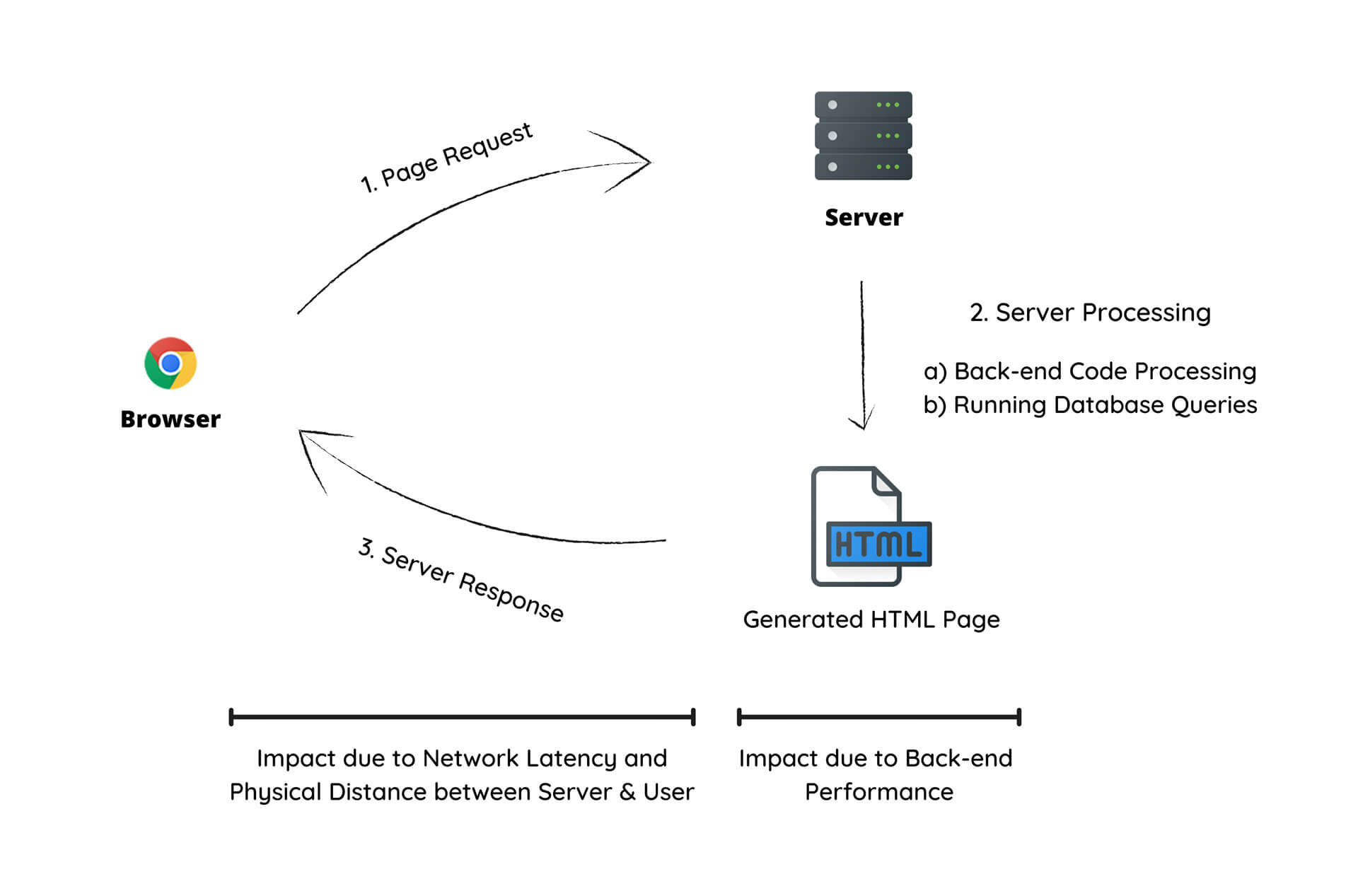
Here’s exactly what contributes in each of these cases:
Server Processing
- Unoptimized & Heavy Backend Code
- Excess Database Queries and Unoptimized Databases
- Low Hardware Resources (Especially in Shared Hosting)
- Excessive Number of Plugins (WordPress & other CMS)
These are some of the major contributors to TTFB. The fourth point is simply an extension to the first point as many Plugins add excessive and unoptimized code to the back end (PHP code in the case of WordPress) which requires extra time to process.
We will simply eliminate all of these factors for the majority of sites as you’ll see later in this article.
Physical Network Distance (Latency)
- Poor Traffic Routing
- Poor Network Performance (Either the Server, the User, or both)
Here’s an example of the difference in initial server response time at different locations around the globe for a website hosted in London, UK. This test was performed using our TTFB Test Tool which can measure Response Time from 25 locations in just one go.
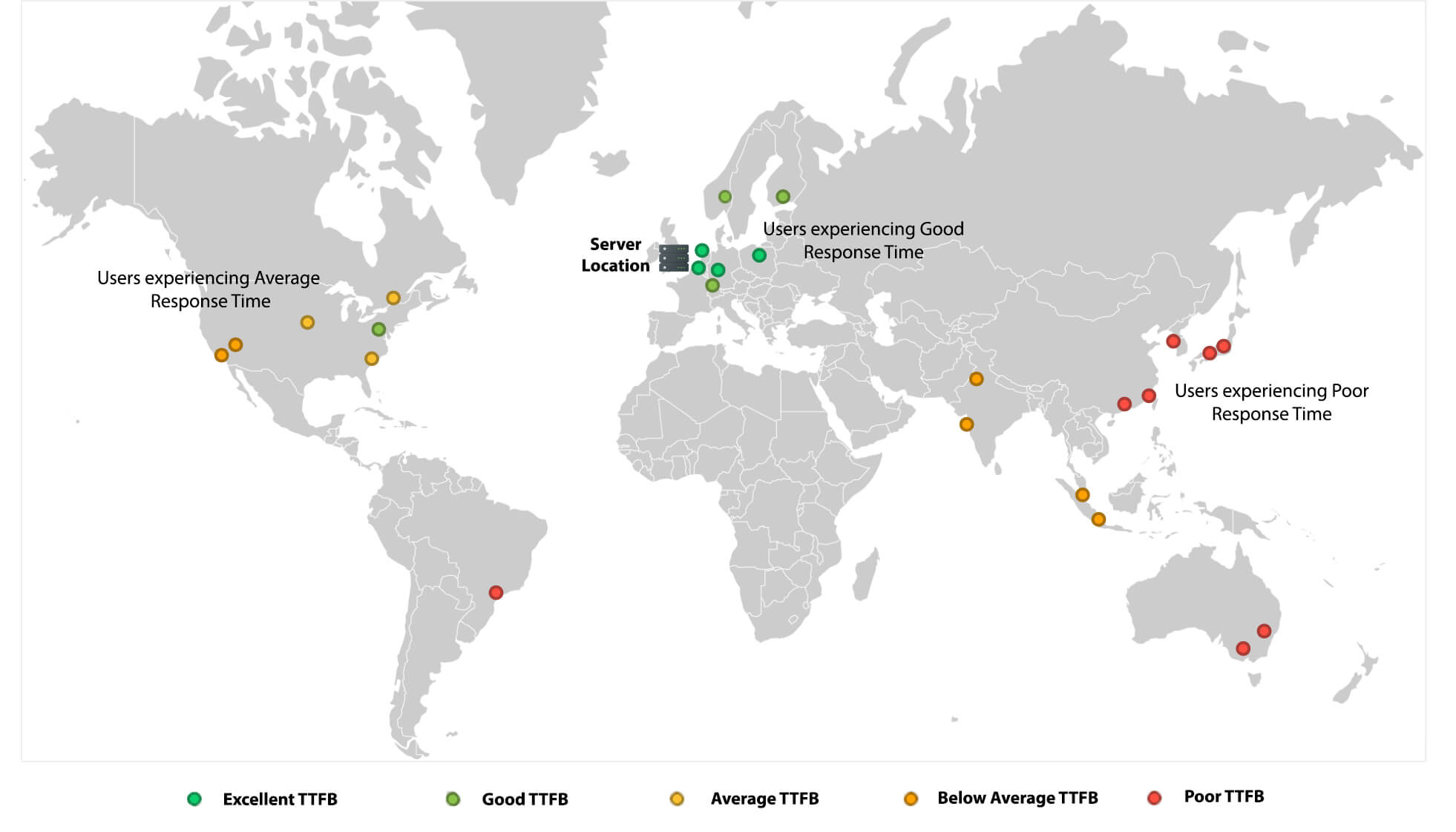
As you can see, the Server Response Time is great in the European Countries as they are physically closer to the Server.
But as we move East to South Asia or West to North America, the response times have increased significantly due to the increased Network Latency. It gets even worse as we move farther to South Korea, Japan, and Australia.
Why CDNs Cannot Fix High TTFB (with solution)
When you integrate a CDN on your Website, the CDN’s job is to deliver the static resources through their edge servers distributed across the globe. However, they only deliver static resources such as CSS, JavaScript, Fonts, and Images and not the HTML.
Thus, when you measure the TTFB of a Web Page after integrating a CDN, you’ll observe no difference. You’ll only observe the difference when you measure the response time of the static resource that is being served by the CDN.
Hence, integrating a CDN will not help you pass the “Reduce Initial Server Response Time” Audit on Lighthouse Powered Tools like Google Page Speed Insights & SpeedVitals.
Solution
A CDN can reduce Server Response Time only if it is also serving the cached HTML Page (which most of them don’t by default). We will have to manually configure a CDN to do so.
Caching the HTML at CDN is also known as “Full Page Caching” or “HTML Caching”.
So far, I’ve only tested Full Page Caching with Cloudflare and BunnyCDN. If you find more CDN Providers where it is supported, let me know in the comments and I’ll test that out.
In the next section, we will discuss how you can implement the same.
How to Reduce Server Response Time
Since one of the biggest contributors to Server Response Time is the Back-End Code Processing Time, the best approach that will result in the biggest performance improvement is to completely eliminate Back-End Processing by converting a Website into a Static Site (or by storing the static version as Cache) and delivering the Static Version from the Edge Locations of a CDN.
And guess what? You can convert most of the dynamic sites into Static without compromising on the dynamic features.
To better understand the different approaches we will be implementing in this article, let us classify a Website into three categories:
Static Site: A website written in HTML, CSS, and JavaScript with no backend Code.
Dynamic Site: A website that uses a Backend that is built-in a programming language such as PHP, JavaScript (Node.js), Ruby, Python, etc., and/or a Database Server such as MySQL, MongoDB, PostgreSQL, etc. These types of sites have templates with Programming Languages Embedded within them. Every time a request is sent to the Server, these templates are converted to HTML files in real time. Most Content Management Systems such as WordPress, Drupal, Joomla, and Magento fall in this category. And same goes for Applications built using Web Frameworks like Django, Laravel, ExpressJS, NestJS, Ruby on Rails, Flask, Spring Boot, and ASP.NET.
Truly Dynamic Site: A dynamic site but the HTML file Content also changes based on the User’s Authentication Status, and its device characteristics such as Location, Device Type, Operating System, Browser, etc.
While we can convert most of the Dynamic sites into Static with ease since their content only changes based on the URL of the requested Web Page, the same cannot be done in the case of Truly Dynamic Sites. For truly dynamic sites, we will need to implement Cache Invalidation techniques for specific situations.
For example, let’s consider a Dynamic Site with User Authentication functionality. The Navigation Bar of this website displays a “Login” or “Logout” button based on the current authentication status of the user. If the cache is cleared and an authenticated user visits the Website, the server will serve an HTML page that displays “Logout” in Navigation Bar, and this version will get cached.
Hence, there’s a possibility that a non-logged user will also end up seeing the “Logout” option in the Navbar when they are not actually logged in. The same can happen with the Cart Page of an E-commerce Store or the Search Feature of any website. We do not want to cache the dynamic features.
But, there are solutions to improve the TTFB of Truly Dynamic sites as well without implementing HTML Caching and we will go through those later in this article.
But first, let us see how we can improve the initial server response time for WordPress. Later on, we will move on to Static/Dynamic sites, and at last, we will discuss Truly Dynamic Sites.
For WordPress Sites
To reduce Server Response Time on WordPress sites, I follow a two-step process:
- Installing a Caching Plugin that can generate Static HTML Pages
- Using a CDN that can replicate HTML Pages to its edge locations across the globe
Here, the first step only comes into play when Cache Hit is not successful but I still recommend this step since it plays a big role in overall performance optimization as Cache plugins perform a lot of other optimizations as well.
Caching Plugin
I use and recommend either WP-Rocket or FlyingPress for WordPress. Both of them generate Static HTML Pages and can dramatically reduce TTFB.
Full Page WordPress Cache on CDN
While the above step takes care of High Response Times due to Back-end Processing, we still need to reduce the Response Times due to Network Latency.
There are various approaches you can follow to enable HTML Caching at your CDN. Here are some that I recommend:
Cloudflare APO
The easiest and one of my favorite options is to enable Cloudflare APO (Automatic Platform Optimizations). However, this isn’t a free feature and costs $5/month. But if you’re on Cloudflare Pro or a higher plan, this feature is available for free.
Cloudflare Full Page Cache using Page Rules
If you want to achieve the same performance as APO for free, you can use enable Full Page Caching using Page Rules. Here’s a guide for the same.
Make sure you follow the guide carefully and handle the things that will break. You’ll need to disable the Admin Bar at the front end. For Search & eCommerce sites using WooCommerce, use themes that use Ajax.
BunnyCDN Full Page Cache
Just like Cloudflare, you can enable Full Page Caching at other CDN Providers such as BunnyCDN. Here’s an excellent guide for the same.
For Static & Dynamic Sites
For Static sites, by default, the TTFB would be great but you’ll need to replicate the same Worldwide. This can be done simply by setting up Cloudflare Page Rules.
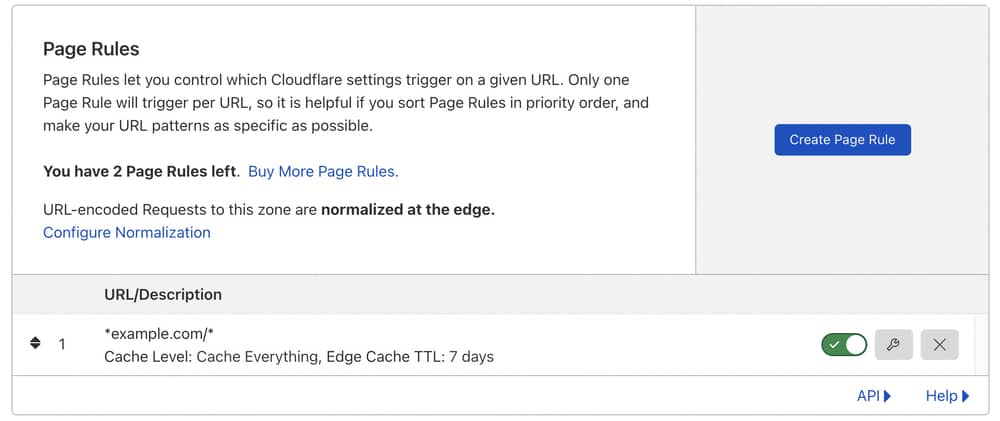
Simply replace example.com with your domain name. This rule will apply to all subdomains on this Website as well. To apply it only on a specific subdomain, replace it with *www.example.com/* where www is the name of the subdomain you want to apply it to.
For Cache Level, select Cache Everything to Enable HTML Caching.
For Edge Cache TTL, select a value based on how often the content changes on your website. I recommend 7 days or 14 days.
The same thing can be applied on dynamic sites as well that meet the following criteria:
- Websites whose content doesn’t change based on the User Characteristics like Device Type, Browser, OS, etc
- Websites whose content doesn’t change based on User Authentication Status and they have separate Dashboards for Logged In Users. Example: A website that doesn’t serve different content to Logged in and Logged Out users on the same URLs. If a user is logged in, instead of changing the home page to User Dashboard for that particular user, they’ll redirect the users to a different location such as example.com/dashboard or app.example.com.
- Use Ajax for features such as Searching and updating the Cart items in case of E-Commerce.
You can use Cloudflare Rules to exclude Website Pages you’re not supposed to Cache such as Admin/User Dashboard, Search Page, Cart, or anything else that could potentially break.
Instead of using Cloudflare Page Rules, there are many alternative solutions that you can give a try. Building Jamstack sites is one of my favorite approaches to building lightning-fast websites. You can host a Jamstack site on places like Netlify, Github Pages, Vercel, Cloudflare Pages, and AWS Amplify.
We have an article that compares the performance difference between Cloudflare Pages & Netlify.
Also, don’t forget to check out Gatsby.js. It is one of my favorite static site generators.
For Truly Dynamic Sites
This approach is for sites that serve different content based on User Characteristics (Authentication Status, Country, Device Type, etc). These are the websites that will require a little more effort to convert into Static Sites.
Hybrid Approach
In Hybrid Approach, we will implement HTML Caching for the guest users but will invalidate the Cache for Authenticated Users.
This approach should be applicable for most sites that fall into this category. Here are the exact steps you need to take for this approach:
- Cache HTML for Non-logged in users (Using the Guide for Static/Dynamic Sites in the previous section)
- Invalidate Cache for Logged-in Users by Cookies, Query Strings, or by redirecting to a dashboard on another page such as example.com/dashboard that you exclude from Full Page Caching.
- Move all the detection scripts (Country, Device, Browser, OS, etc) on the front-end and manipulate the DOM content accordingly.
- (Optional) Use Load Balancing with Multiple Servers for Logged-in Users so that they can experience better performance as well irrespective of their distance from the Hosting Server
Reducing TTFB without Caching HTML
This section is for websites where implementing Hybrid Techniques is not possible due to some reason.
Hence, instead of converting the Website into a Static one, we will need to optimize the Dynamic Version. Here are some of the steps you can take to reduce TTFB.
Optimizing the Code
This will vary for every framework and you’ll need to explore the best practices to improve response times. You’ll need to profile the code and trace the slowest portions of the code and modules/plugins affecting the performance.
Try using Algorithms with the least Complexity and follow good Programming Practices.
Upgrading Server Hardware
This can have a major impact on Server Response Times if the hardware is the major limiting factor. I’ll highly recommend avoiding Shared Hosting if you want to optimize the response times of a Truly Dynamic Website.
If you’re already using a VPS, test your website with a new server with higher hardware resources to see if you observe any performance benefits.
Switching to NVMe SSDs and multi-core CPUs, and Increasing the Memory can give a major boost to your Web Application.
For small to medium-scale websites, I recommend Vultr’s High-Frequency VPS, Digitalocean Premium AMD Droplet, and Digitalocean’s General Purpose & CPU-Optimized Droplets.
For bigger and more complex websites, I recommend Google Cloud, Amazon Web Services, and Microsoft Azure.
Moving some of the Back-end Calculations to the client side
Try moving some portion of code from the back end to the Client-Side. Modern devices are getting more powerful each year and they can perform a lot of operations without any slowdown.
Alternatively, you can use Web Workers to offload some of the Computation using a service such as Cloudflare Workers, AWS Lambda, and Akamai EdgeWorkers.
Choosing a Faster Web Server
I recommend OpenLiteSpeed and Nginx over Apache for better performance.
Optimizing Database
Here are some steps you can take to optimize the Database Performance:
- Choose a Performance Database like MariaDB over MySQL
- Write and Execute more Efficient Queries
- Implement Beter Indexing
- Clean Up Databases Regularly
- Keep the Database Version Up to Date
Keeping Framework/Programming Language Up to Date
Keep your Web App to date with the latest versions of the Programming Language and Framework. The new updates can bring in several performance improvements and bug fixes.
For example, the latest PHP version, i.e. PHP 8 can handle nearly twice as many requests per second when compared to PHP 5.6.
Implementing Caching Techniques
Caching Techniques like Memcached, Redis, and Varnish can improve Server Response Times by a big margin. For PHP-based sites, I highly recommend PHP-FPM.
Reducing TTFB Globally
For all the Non-Truly-Dynamic Sites, it was easy to reduce Server Response Time Globally by serving HTML from CDN’s Edge Locations.
But in this case, we will need multiple servers across the globe. Then, we will use a Load Balancer to deliver content to your users from the closest Server Geographically.
For this approach, we will need to decide geographical locations for our Servers.
You should choose the Locations based on where the majority of websites users live. If you have a global audience, I’ll recommend at least three locations to host the servers:
- California, United States (For North & South America)
- London, United Kingdom (For Europe)
- Singapore (For Asia Pacific)
If you get a lot of visitors from South Asia, Africa, and the Middle East, you can also opt for another server in the following locations: Mumbai, India for South Asia, Dubai for the Middle East, and Johannesburg, South Africa for the Africa region.
If you have higher budgets, you can always deploy a lot more servers across different geographical regions to ensure all your users get an excellent experience.
I highly recommend Cloudflare’s Load Balancer or Akamai Load Balancer for this Purpose. Alternatively, you can also check out Google Cloud Load Balancing, Digitalocean Load Balancer, Azure Load Balancer, and Elastic Load Balancer.
Summing Up
In this article, we mainly discussed all the possible ways to convert a Dynamic site into Static since it is one of the most effective ways to dramatically reduce the Server Response Time. You can easily achieve a response time below 200 ms worldwide using the techniques I mentioned in this article.
A low response time makes websites lightning fast and makes a site more likely to pass the Web Vitals test. Once you implement one of the above strategies, do share the before vs after results with me in the comments section.