
Benefits of Delaying Javascript

Patient Tools

Read, save, and share this guide

Use these quick tools to make this medical article easier to read, print, save, or share with a family member.

On this page8 sections

Article Summary

If someone asked me a single powerful technique that can massively improve Website Load Time and Web Vitals, I would say Delaying all the external and other JavaScript files that are not required for rendering the above-the-fold paint. Today, I’ll be sharing with you the benefits of Delaying JavaScript Code and also how you can implement it on both WordPress as well as non-WordPress sites....

Key Takeaways

  • This article explains Benefits of Delaying Javascript in simple medical language.
  • This article explains What Files Can be Safely Delayed in simple medical language.
  • This article explains How to Implement in simple medical language.
Before reading

RX Patient Tools

Use these quick guides before reading the article, or return to them when you need help preparing questions for a doctor.

Start here Choose the right pathway for symptoms, reports, medicines, or urgent warning signs. Disease article roadmap Read this topic step by step: meaning, symptoms, warning signs, diagnosis, treatment, prevention, and follow-up. Treatment planner Prepare questions about treatment choices, benefits, risks, side effects, and follow-up. Family & caregiver guide Organize symptoms, reports, medicines, questions, and follow-up safely. Nutrition & diet guide Prepare food, hydration, supplement, and medicine-timing questions safely. Prevention guide Organize risk factors, protective habits, screening, and warning signs. Recovery guide Prepare a safe plan for activity, rehabilitation, warning signs, and follow-up.
Educational health guideWritten for patient understanding and clinical awareness.
Reviewed content workflowUse writer and reviewer profiles for stronger trust.
Emergency safety firstUrgent warning signs are highlighted below.
Definition

If someone asked me a single powerful technique that can massively improve Website Load Time and Web Vitals, I would say Delaying all the external and other JavaScript files that are not required for rendering the above-the-fold paint.

Today, I’ll be sharing with you the benefits of Delaying JavaScript Code and also how you can implement it on both WordPress as well as non-WordPress sites. Let’s jump right into it!

Benefits of Delaying Javascript

Delaying JavaScript can bring a massive improvement to the following Web Vitals:

  • First Contentful Paint
  • Total Blocking Time (& First Input Delay)
  • Time to Interactive

The fully loaded page time will also be significantly lower.

Third-party scripts that are meant for Tracking, , and displaying Advertisements block the page from rendering and it results in poor Web Vitals Score.

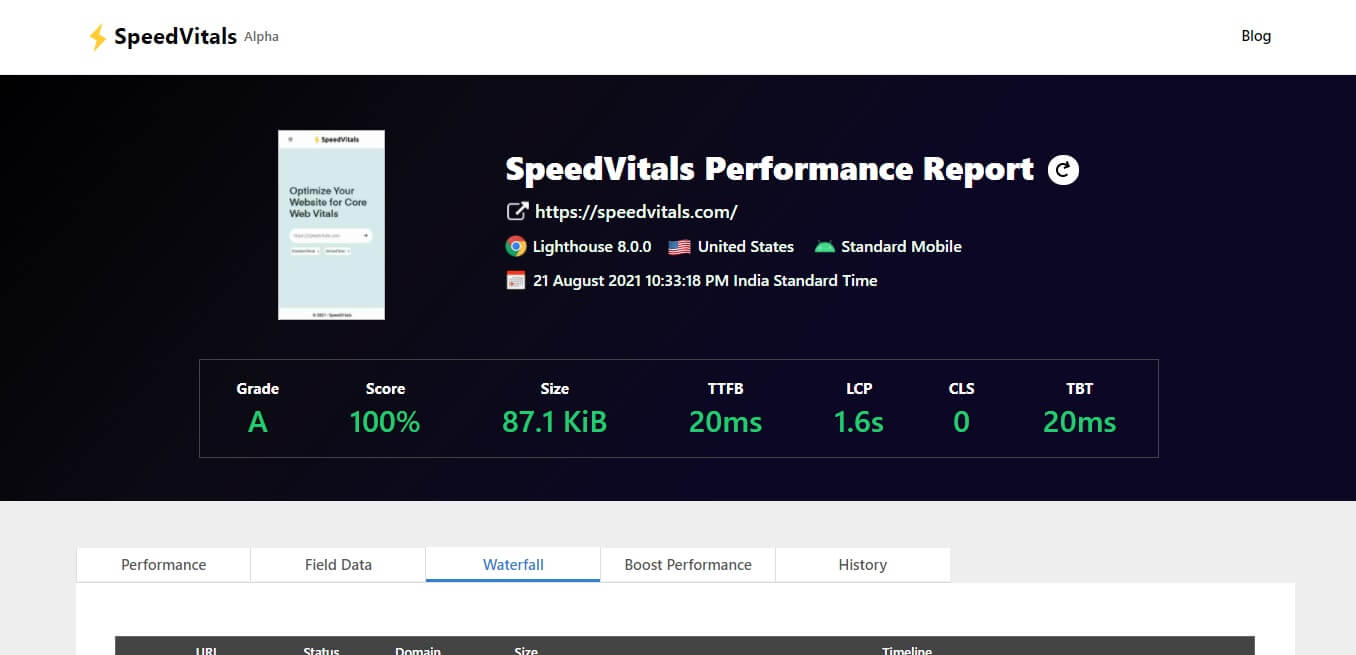
The best example to showcase how effective delaying is can be seen on our own website 
Benefits of Delaying Javascript

We have delayed the scripts for Google Analytics, Facebook Pixel, and Hotjar. Without Delaying them, it would have been nearly impossible for us to score 100% at the Standard Mobile configuration.

Async vs Defer vs Delay

Most websites on the Internet are already using Async and Defer to improve page load times. However, it is usually not enough to provide a major performance boost.

Let’s first look at the code snippets to understand the differences in the implementation of each technique.

Normal Load

<script src="script.js"></script>

Async

<script async src="script.js"></script>

Defer

<script defer src="script.js"></script>

Delay

<script delay="script.js"></script>

Here, the “delay” is not an official HTML attribute and it is only playing the role of a placeholder that will be used to identify the scripts that are delayed and on user interaction, we will copy the value of the delay attribute to src.

We can also use any other keyword instead of delay.

Without the async or defer attribute, the script is fetched and executed and the page parsing is paused until the script execution finishes. This practice results in poor performance.

When we use the async attribute, it loads the script in parallel to parsing the page and then executes it as soon as the script loads.

When we use the defer attribute, it loads the script in parallel to parsing the page but only executes it after the page has finished loading.

As you would have guessed, defer is a far better choice compared to async. You can find a detailed comparison between the two in this article by Flavio Copes.

But what if we completely stop the fetching and execution of scripts until a user interacts with the page?

That’s exactly what we will be doing today. To delay a file, we simply remove the src attribute and replace it with a random attribute. In this article, we will be replacing it with delay.

Since the src attribute is missing, the browser won’t load the script file and when the user interacts with the webpage (Scroll, Mouse Movement, Key Press, Touch), we replace the delay attribute with src in the page source and the browser begins loading and executing the scripts.

Compatibility

Delaying JavaScript works with all the modern browsers including Chrome, Safari, Firefox, Edge, and all the Chromium-powered browsers including Brave and Opera.

However, Internet Explorer 11 is not supported. If a small portion of your website visitors still use Internet Explorer, you’ll need to create a fallback that would redirect IE users to a different page without the JS Delay.

If you use WordPress, the Delay JS feature in WP-Rocket automatically redirects Internet Explorer users to the unoptimized version of the page.

However, I wouldn’t recommend any Developer to continue support for an obsolete browser in 2021. Even Microsoft is dropping Internet Explorer support on June 15, 2022.

What Files Can be Safely Delayed

The following are the file categories that I recommend delaying. However, you’ll still have to make sure that everything works just as before after implementing this optimization.

  • Tracking & Analytics (Google Analytics, Hotjar, Facebook Pixel, Statcounter, Google Tag Manager etc)
  • Advertisement Scripts (Google Adsense, Amazon Ads, Taboola, Outbrain, Media.net, etc)
  • Social Media Follow/Like Button Embeds
  • Customer Support and Live Chat (Zendesk, Customerly, Intercom, tawk.to, Olark, etc)
  • Other Third-Party Scripts (Disqus Comments, Facebook Comments, Cookie Consent, etc)
  • Non-Third-Party Scripts that are not essential for rendering above the fold content

Files to Avoid

Here are the files that will cause problems if delayed.

  • JQuery
  • All the Dependencies that are utilized by other script files (These dependencies cannot be deferred either)
  • Files responsible for rendering the First Paint above the fold

How to Implement

If you’re using WordPress, there are already several plugins available that can implement this feature in no time. But for other sites, we have a step-by-step guide in the next section.

For WordPress Sites

The following plugins provide the JavaScript Delay feature.

If you need a tutorial on Enabling Delay JS using Flying Scripts, you should check out this video. WP-Rocket users can take the help of this guide. Perfmatters have their own guide as well.

For Non-WordPress Sites

So it’s time to implement the code on all the custom-built sites.

Here’s the code we will be using to load the delayed scripts.


const autoLoadDuration = 5; //In Seconds
const eventList = ["keydown", "mousemove", "wheel", "touchmove", "touchstart", "touchend"];

const autoLoadTimeout = setTimeout(runScripts, autoLoadDuration * 1000);

eventList.forEach(function(event) {
    window.addEventListener(event, triggerScripts, { passive: true })
});

function triggerScripts() {
    runScripts();
    clearTimeout(autoLoadTimeout);
    eventList.forEach(function(event) {
         window.removeEventListener(event, triggerScripts, { passive: true });
    });
}

function runScripts() {
    document.querySelectorAll("script[delay]").forEach(function(scriptTag) {
        scriptTag.setAttribute("src", scriptTag.getAttribute("delay"));
    });
}

This is a simple code that is basically looking for all the scripts with delay attributes and adding a src tag them on either the user interaction or after a certain time interval (whichever comes first).

You can specify after how many seconds the scripts should automatically load after the page finishes loading using autoLoadDuration.

We are using the following events in this code. You can customize this list as well. But for most cases, the mousemove, keydown, touchmove, and touchstart events should be good enough.

Here’s an explanation of what triggers each of these events:

  • keydown: When the user presses a key
  • mousemove: When the user moves the cursor
  • wheel: When the user scrolls the mouse
  • touchmove: When the user moves a finger across a touch screen
  • touchstart: When the user touches the screen
  • touchend: When the user releases the touch

Here are the step-by-step instructions to implement this code on your website.

Make a List of Files to Delay

Make a list of all the JavaScript files that you are safe to delay using the discussion we had in the previous section. If any of those scripts are inline, you can move them to an external file.

Replace the src Attribute

Replace the src attribute of all the files you chose in the previous step and replace it with the delay attribute.

Add JS Delay Code

Here’s the same code from above but I have minified it. You can either inline this somewhere before the closing of body tags or load it from an external file.

const autoLoadDuration = 5;
const eventList = ["keydown", "mousemove", "wheel", "touchmove", "touchstart", "touchend"];const autoLoadTimeout=setTimeout(runScripts,1e3*autoLoadDuration);function triggerScripts(){runScripts(),clearTimeout(autoLoadTimeout),eventList.forEach(function(t){window.removeEventListener(t,triggerScripts,{passive:!0})})}function runScripts(){document.querySelectorAll("script[delay]").forEach(function(t){t.setAttribute("src",t.getAttribute("delay"))})}eventList.forEach(function(t){window.addEventListener(t,triggerScripts,{passive:!0})});

To help you better understand what we just did, here’s an example on JSFiddle.

When you’ll open the Result Tab, only one line would be displayed “This code is not delayed” but once you’ll hover your mouse over there, it will load the test.js file that will print “This code is delayed”.

Testing

To check whether the Delay is actually working, open the network tab in Chrome’s Developer Console and reload your webpage. After the page load finishes, move your mouse over the Web Page and you’ll see network activity confirming that the delayed files are loading on user interaction. You can confirm the same thing on the Sources tab as well.

Once you’ve confirmed JavaScript Delay is working, make sure to test that everything is working on the Website as expected and there are no errors in the console.

Doctor visit helper

Prepare before seeing a doctor

A simple rural-patient checklist to help you explain symptoms clearly, ask better questions, and avoid unsafe self-treatment.

Safety note: This is not a prescription or diagnosis. For severe symptoms, pregnancy danger signs, children with serious illness, chest pain, breathing difficulty, stroke-like weakness, or major injury, seek urgent care.

Which doctor may help?

Start with a registered doctor or the nearest qualified health center.

What to tell the doctor

  • Write when the problem started and how it changed.
  • Bring old prescriptions, investigation reports, and current medicines.
  • Write allergies, pregnancy status, diabetes, kidney/liver disease, and major past illnesses.
  • Bring one family member if the patient is weak, elderly, confused, or a child.

Questions to ask

  • What is the most likely cause of my symptoms?
  • Which danger signs mean I should go to hospital quickly?
  • Which tests are necessary now, and which can wait?
  • How should I take medicines safely and what side effects should I watch for?
  • When should I come for follow-up?

Tests to discuss

  • Vital signs: temperature, pulse, blood pressure, oxygen saturation
  • Basic physical examination by a clinician
  • CBC, urine test, blood sugar, or imaging only when clinically needed

Avoid these mistakes

  • Do not use antibiotics, steroid tablets/injections, or strong painkillers without proper medical advice.
  • Do not hide pregnancy, kidney disease, ulcer, allergy, or blood thinner use.
  • Do not delay emergency care when danger signs are present.

Medicine safety and first-aid guide

This section is for patient education only. It does not replace a doctor, pharmacist, or emergency care.

Safe first steps

  • Avoid heavy lifting, sudden bending, and prolonged bed rest.
  • Use comfortable posture and gentle movement as tolerated.
  • Discuss physiotherapy, X-ray, or MRI only when clinically needed.

OTC medicine safety

  • For mild back pain, pain-relief medicine may be discussed with a doctor or pharmacist.
  • Avoid repeated painkiller use if you have kidney disease, stomach ulcer, uncontrolled blood pressure, or are taking blood thinners.

Avoid these mistakes

  • Do not start antibiotics without a proper medical decision.
  • Do not use steroid tablets or injections casually for quick relief.
  • Do not delay emergency care because of home remedies.

Get urgent help if

  • Back pain with leg weakness, numbness around private area, loss of urine/stool control, fever, cancer history, or major injury needs urgent care.
Medicine names, dose, and timing must be decided by a qualified clinician or pharmacist after checking age, pregnancy, allergy, other diseases, and current medicines.

For rural patients and family caregivers

Patient health record and symptom diary

Write your symptoms, medicines already taken, test results, and questions before visiting a doctor. This note stays on your device unless you print or copy it.

Doctor to discuss: Doctor / qualified healthcare provider
Tests to discuss with doctor
  • Basic vital signs: temperature, pulse, blood pressure, oxygen level if needed
  • Relevant blood, urine, imaging, or specialist tests only after clinical assessment
Questions to ask
  • What is the most likely cause of my symptoms?
  • Which warning signs mean I should go to emergency care?
  • Which tests are really needed now?
  • Which medicines are safe for my age, pregnancy status, allergy, kidney/liver/stomach condition, and current medicines?

Emergency warning signs such as chest pain, severe breathing difficulty, sudden weakness, confusion, severe dehydration, major injury, or loss of bladder/bowel control need urgent medical care. Do not wait for online information.

Safe pathway to proper treatment

Care roadmap for: Benefits of Delaying Javascript

Use this simple roadmap to understand the next safe steps. It is educational and does not replace examination by a doctor.

Go to emergency care if you notice:
  • Severe or rapidly worsening symptoms
  • Breathing difficulty, chest pain, fainting, confusion, severe weakness, major injury, or severe dehydration
Doctor / service to discuss: Qualified healthcare provider; specialist depends on symptoms and examination.
  1. Step 1

    Check danger signs first

    If danger signs are present, seek emergency care and do not wait for online information.

  2. Step 2

    Record the symptom story

    Write when symptoms started, severity, medicines already taken, allergies, pregnancy status, and test results.

  3. Step 3

    Visit a qualified clinician

    A doctor, nurse, or qualified healthcare provider can examine you and decide which tests or treatment are needed.

  4. Step 4

    Do only useful tests

    Do tests after clinical assessment. Avoid unnecessary tests, random antibiotics, or repeated medicines without diagnosis.

  5. Step 5

    Follow up and return early if worse

    If symptoms worsen, new warning signs appear, or treatment is not helping, return for review quickly.

Rural patient practical tips
  • Take a written symptom diary and all previous prescriptions/test reports.
  • Do not hide medicines already taken, even herbal or over-the-counter medicines.
  • Ask which warning signs mean urgent referral to hospital.

This roadmap is for education. A real diagnosis and treatment plan requires history, examination, and clinical judgment.

Internal learning pathway

Explore related RX articles

Related guides from RX Harun are grouped to help readers move from overview to symptoms, tests, treatment, and safe next steps.

Rx Web Design, and Development Guide (A - Z)
  1. index.php Definitionreating an index.php file typically serves as the entry point for a PHP web application. Below…
  2. Performance Optimization Tools of Github DefinitionHere’s a list of 100 useful GitHub repositories that can help with website optimization, covering various…
  3. Content Delivery Network (CDN) DefinitionTo connect a CDN (Content Delivery Network) file to your website, follow these steps: Choose a…
  4. What is VPN? How It Works, Types of VPN DefinitionVPN stands for “Virtual Private Network” and describes the opportunity to establish a protected network connection when using…
  5. WordPress Speed Up and Optimizing Plugin DefinitionWhether you run a high traffic WordPress installation or a small blog on a low cost…
  6. Best Proxy and Anti Fingerprint Browser DefinitionThe anti fingerprint browser industry is growing insanely fast. So, getting to the end of the…