
Scale, performance, and efficient deployment of state-of-the-art Deep Learning models are ubiquitous challenges as applied machine learning grows across the industry. We’re happy to see that the ONNX Runtime Machine Learning model inferencing solution we’ve built and use in high-volume Microsoft products and services also resonates with our open source community, enabling new capabilities that drive content relevance and productivity.
We’re excited to share the development journey of one of our community adopters, Hypefactors, to solve a challenging technical scaling problem.
This blog post was co-authored by:
Scaling inference volume
Serving complex transformer models in production for high-volume inferencing is not an easy task. This post shares how we tackled this problem at Hypefactors to scale our PyTorch transformer-based model to billions of inferences per day.
Hypefactors provides SaaS technology for media intelligence to drive business insights that can reveal early business opportunities, measure trust and reputation, track the success of product launches, and preempt disasters. Currently, our services process over 10 million articles, videos, and images a day, adding enrichments on-demand using deep learning models.
Our latest product investment extends beyond on-demand enrichment to pre-enrich all ingested content, which enables novel filtering and data aggregation to unlock new business insights. We use ONNX Runtime to address many of our performance and framework compatibility challenges to scale our machine learning infrastructure from millions to billions of daily inferences for a natural language processing (NLP) model.
Defining our strategy
At a high level, we started with key requirements for quality and performance:
- Quality: to meet our functional quality bar, we chose a named entity recognition (NER) transformer-based model trained through PyTorch.
- Performance: to enrich the volume of streamed data and scale to billions of daily inferences, high performance will be critical.
To meet these requirements, we had to evaluate GPU acceleration and horizontal scaling, and ensure that these would be cost-effective with an economic life span of at least two years. This led to operational and extensibility considerations, such as observability, deployment effort, testing thoroughness, and architecture reusability for future planned NLP tasks.
To tackle this challenge, we landed on two pillars for our strategy:
- Identify the best-suited infrastructure to serve the model.
- Identify the most efficient model possible.
Infrastructure scale-up experiments
Based on experience from operating our current infrastructure, we looked at three potential solutions for serving the model:
- NVIDIA Triton Inference Server on Kubernetes
- FastAPI on Kubernetes
- DJL
Triton on Kubernetes
We were excited about NVIDIA’s recent development on Triton Inference Server, as it’s designed to simplify GPU operations—one of our biggest pain points.
Pros
- Multi-model support with GPU sharing (this turned out less beneficial than on paper for us, given that our models are large and receive high sustained load that leads to resource contention).
- Built-in observability of GPU metrics, queued requests, and request metadata. These metrics facilitate horizontal scaling and identifying bottlenecks.
- Server-side batching is available out of the box, thus exploiting more of the GPU’s data-parallelism.
- Resource stability under high concurrency of requests and high load.
Cons
- Triton is quite an elaborate (and therefore complex) system, making it difficult for us to troubleshoot issues. In our proof-of-concept tests, we ran into issues that had to be resolved through NVIDIA’s open source channels. This comes without service level guarantees, which can be risky for business-critical loads.
FastAPI on Kubernetes
FastAPI is a high-performance HTTP framework for Python. It is a machine learning framework agnostic and any piece of Python can be stitched into it.
Pros
- In contrast to Triton, FastAPI is relatively barebones, which makes it easier to understand.
- Our proof-of-concept benchmarks show that the inference performance of FastAPI and Triton are comparable.
Cons
- FastAPI is intended to serve as a generic HTTP (micro) service framework. It, therefore, does not come with GPU and machine learning relevant functionality, such as server-side batching to maximize GPU utilization and observability to facilitate horizontal scaling.
DJL
DJL is a machine learning-engine agnostic framework for JVM-based deep learning. It’s a more natural fit for our data pipelines, which are all written in Scala and run on the JVM. We have long-standing experience integrating models in production using DJL.
Pros
- In contrast to FastAPI and Triton, DJL enables deep integration with our data pipelines. The result would be less overhead and less failure modes associated with networking. For our (relatively small) team size, this meant less abstractions to maintain and less operational effort.
Cons
- PyTorch is very popular for model training. Although DJL supports PyTorch, the Python ecosystem and community is much larger, meaning that most pre-processing (tokenization, for example) and post-processing code is written in Python. We would have to keep two code versions for the same processing logic in sync.
- Scala is not a language most data scientists are familiar with, leading to more load on the MLOps staff.
ONNX Runtime: The common thread
While we explored the tradeoffs between DJL, FastAPI, and Triton for model serving, we were quite settled on using ONNX Runtime as the inference engine. Since ONNX Runtime is well supported across different platforms (such as Linux, Mac, Windows) and frameworks including DJL and Triton, this made it easy for us to evaluate multiple options. ONNX format models can painlessly be exported from PyTorch, and experiments have shown ONNX Runtime to be outperforming TorchScript. For all those reasons ONNX Runtime was the way to go.
On top of that, ONNX Runtime helps to make high-volume machine learning inferencing more cost-effective through out-of-the-box optimizations, quantization, and integrations with various hardware accelerators. We’ll touch more on this in the model scale-up sections below.
Model scale-up experiments
The top priority in our development process is model quality, and we don’t begin model scaling experiments until after we’ve validated the trained model against production use cases. While we experiment with strategies to accelerate inference speed, we aim for the final model to have similar technical design and accuracy.
CPU versus GPU
ONNX Runtime supports both CPU and GPUs, so one of the first decisions we had to make was the choice of hardware.
For a representative CPU configuration, we experimented with a 4-core Intel Xeon with VNNI. We know from other production deployments that VNNI + ONNX Runtime could provide a performance boost over non-VNNI CPUs. If this proved to be sufficient, it would easily scale by choosing CPUs with a higher core count. For the GPU, we chose NVIDIA’s Tesla T4. To our knowledge, it has the best performance/cost tradeoff, supports tensor cores, and is readily available in the clouds we use.
We set up two benchmark configurations, one with ONNX Runtime configured for CPU, and one with the ONNX runtime using the GPU through CUDA. To get the worst-case scenario throughput, all the reported measures are obtained for maximum input lengths. In our case that meant 256 tokens.
To fully leverage GPU parallelization, we started by identifying the optimal reachable throughput by running inferences for various batch sizes. The result is shown below.
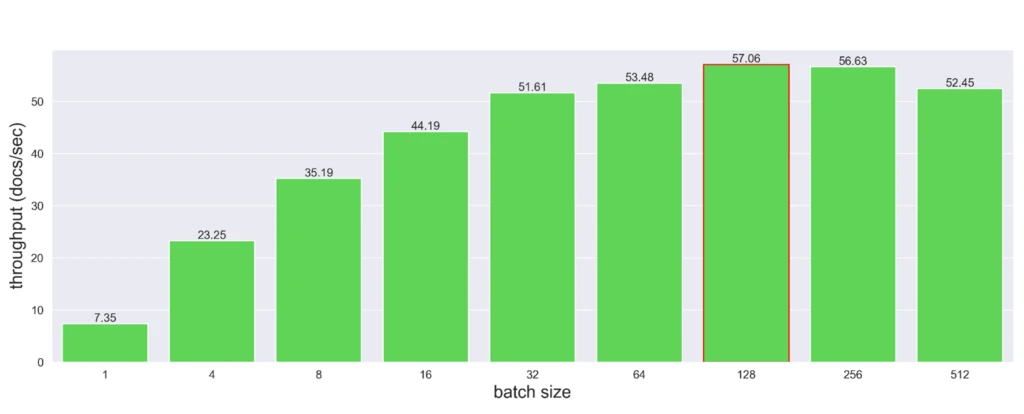
We noticed optimal throughput with a batch size of 128, achieving a throughput of 57 documents per second. Meanwhile, running inferences on CPU only yielded a throughput of 2.45 samples per second, 23 times slower than the GPU.
Accounting for hardware renting costs, the Tesla T4 was our best option.
We further optimized batching inferences through dynamic padding. Instead of padding all the inputs to the maximum model length, we extended them to the longest batch’s sequence. Note: our benchmarks use the maximum input length, and therefore dynamic padding does not impact the above numbers.
Pruning and distillation
Our subsequent investigation was in reducing the model’s size. Since the backbone of our model is a transformer model of ~2GB, we explored other pre-trained models while trying to maintain comparable performance. We also experimented with state-of-the-art shrinking techniques like distillation and training-aware pruning. However, in all these explorations, the accuracy either dropped significantly or was not worth the minor latency improvements.
Inference runtimes
After the previous unfruitful endeavors, we took a deeper look at alternate inference runtimes for our PyTorch model. Along with ONNX Runtime (ORT), we briefly considered TorchScript and stand-alone TensorRT.
TorchScript was quickly dismissed for its lack of benefits beyond ONNX. TensorRT optimizes a model for a specific GPU model, attempting to build a so-called “plan” that maximizes the utilization of the available shader and tensor cores. After several iterations, we managed to optimize a model with TensorRT, but ran into bugs that prevented us from considering it for production deployment.
We found ONNX Runtime to provide the best support for platform and framework interoperability, performance optimizations, and hardware compatibility. ORT supports hardware-specific graph optimizations and provides dedicated optimizations for transformer model architectures. ORT was straightforward to use. PyTorch provides built-in support for exporting ONNX models, and the broad operator coverage made this process quite smooth. Once successfully exported, models could directly be optimized with a simple command-line invocation, see code snippet below:
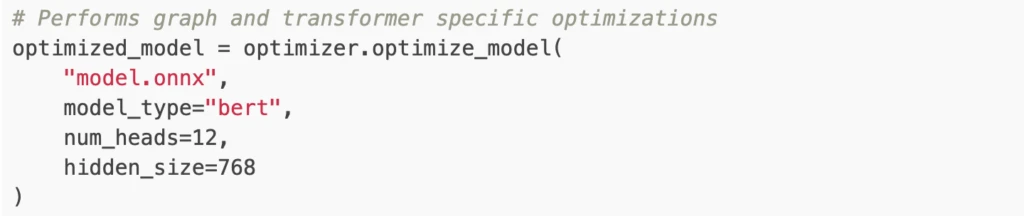
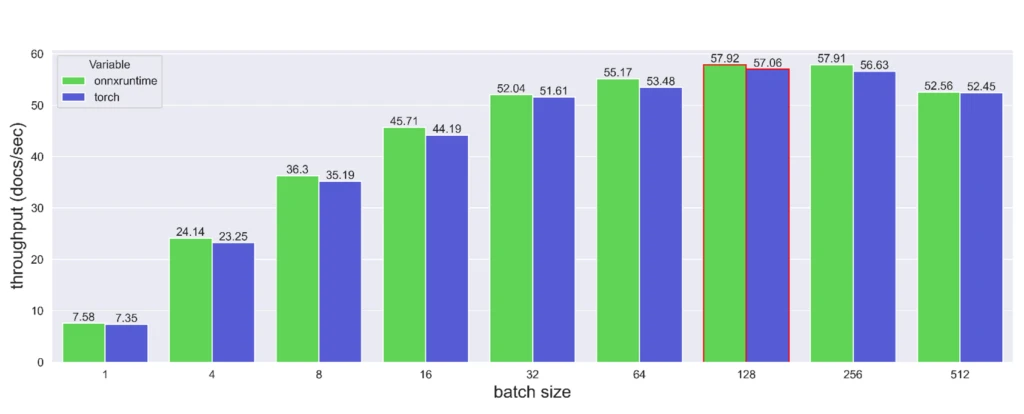
After optimizing the graph, we assessed the potential throughput improvement. On CPU, ORT achieved a throughput of 3.125 documents per second, a 27 percent improvement over PyTorch. On T4 GPUs, the comparison between PyTorch + CUDA and ORT + CUDA is shown below. The ONNX Runtime model was slightly faster, but not significant.
ONNX Runtime quantization
Beyond just running the converted model, ONNX Runtime features several built-in optimizations techniques. We first investigated dynamic quantization. Quantizing a neural network lets you convert the weights of your model from a high-resolution datatype (such as FP64) to a lower resolution data-type (such as INT8). However, depending on the model’s architecture, quantization can dramatically corrupt the model’s weights. This turned out to be the case and the performance of our NER model noticeably degraded by approximately 14 f1 points.
A less aggressive quantization was subsequently explored. We tried to half the precision of our model (from fp32 to fp16). Both PyTorch and ONNX Runtime provide out-of-the-box tools to do so, here is a quick code snippet:
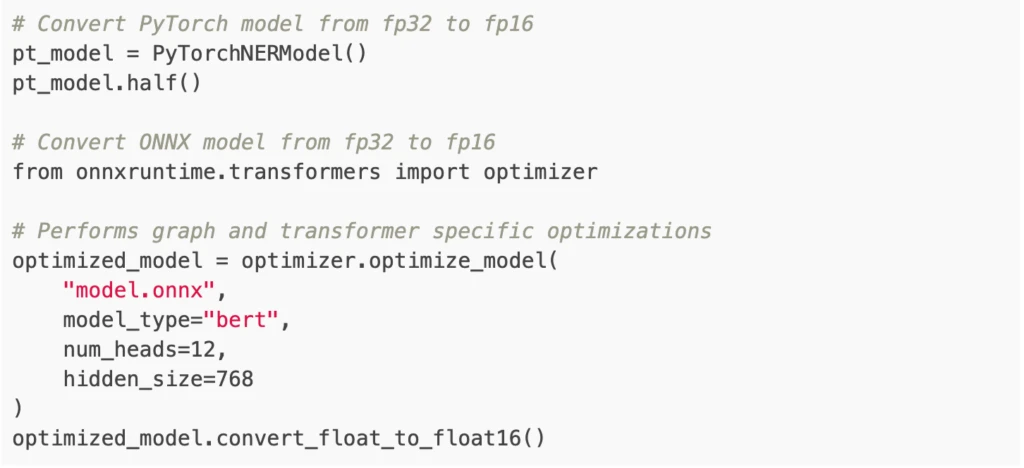
Storing fp16 data reduces the neural network’s memory usage, which allows for faster data transfers and lighter model checkpoints (in our case from ~1.8GB to ~0.9GB). Also, high-performance fp16 is supported at full speed on Tesla T4s. The performance of the fp16 model was left unchanged, and the throughput compared with the previous optimization attempts is reported below.
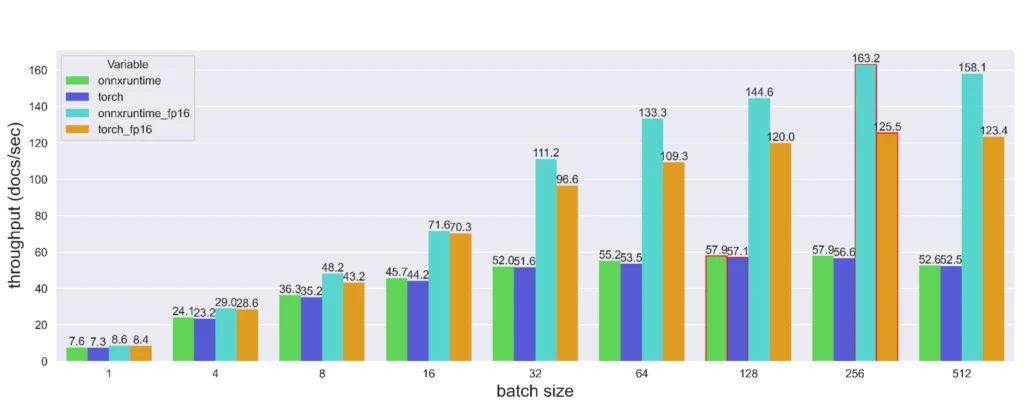
The throughput gain from converting the model to float16 increases in significance with larger batch sizes. Even though lowering the precision of the PyTorch model’s weights significantly increases the throughput, its ORT counterpart remains noticeably faster.
Ultimately, by using ONNX Runtime quantization to convert the model weights to half-precision floats, we achieved a 2.88x throughput gain over PyTorch.
Conclusions
Identifying the right ingredients and corresponding recipe for scaling our AI inference workload to the billions-scale has been a challenging task. We had to navigate the whole array of Kubernetes, GPU acceleration, driver configurations, I/O bottlenecks, tensor-oriented computing, and big data streaming frameworks. By approaching this quest from two main dimensions, model improvements and infrastructure choice for serving the model, we were able to identify a practical solution that met our demanding requirements.
The improvements on the model are highly successful. While many improvement attempts did not yield any benefit, a few of them demonstrated efficacy: ORT-based quantization from fp32 to fp16 on our NER model yields a triple scaling boost when running on GPU.
Infrastructure-wise, we prototyped the three considered infrastructures, Triton Inference Server, FastAPI and DJL. We found that DJL yields the best compromise. Our DJL-based solution using ONNX Runtime is currently in its last stage of development validation and tested against our production loads.
Overall, we’re excited by the results we’ve seen using DJL combined with ONNX Runtime for accelerating and scaling up our PyTorch model inferencing workloads and are looking forward to battle-test the combination in production as we launch the feature.

