
AutoGen offers a unified multi-agent conversation framework as a high-level abstraction of using foundation models. It features capable, customizable and conversable agents which integrate LLMs, tools, and humans via automated agent chat. By automating chat among multiple capable agents, one can easily make them collectively perform tasks autonomously or with human feedback, including tasks that require using tools via code.
This framework simplifies the orchestration, automation and optimization of a complex LLM workflow. It maximizes the performance of LLM models and overcome their weaknesses. It enables building next-gen LLM applications based on multi-agent conversations with minimal effort.
Agents
AutoGen abstracts and implements conversable agents designed to solve tasks through inter-agent conversations. Specifically, the agents in AutoGen have the following notable features:
- Conversable: Agents in AutoGen are conversable, which means that any agent can send and receive messages from other agents to initiate or continue a conversation
- Customizable: Agents in AutoGen can be customized to integrate LLMs, humans, tools, or a combination of them.
The figure below shows the built-in agents in AutoGen. 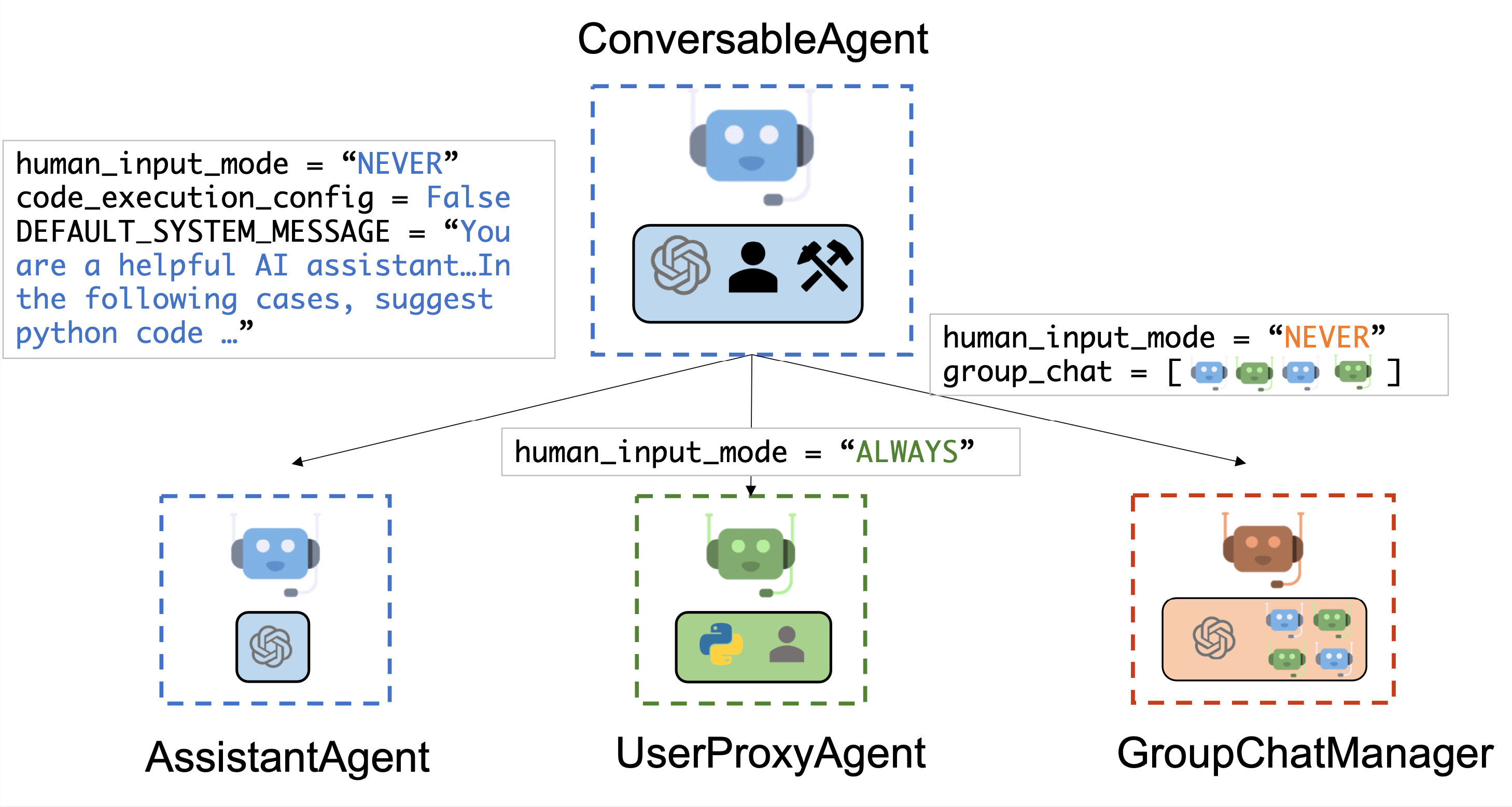
We have designed a generic ConversableAgent class for Agents that are capable of conversing with each other through the exchange of messages to jointly finish a task. An agent can communicate with other agents and perform actions. Different agents can differ in what actions they perform after receiving messages. Two representative subclasses are AssistantAgent and UserProxyAgent
- The
AssistantAgentis designed to act as an AI assistant, using LLMs by default but not requiring human input or code execution. It could write Python code (in a Python coding block) for a user to execute when a message (typically a description of a task that needs to be solved) is received. Under the hood, the Python code is written by LLM (e.g., GPT-4). It can also receive the execution results and suggest corrections or bug fixes. Its behavior can be altered by passing a new system message. The LLM inference configuration can be configured via [llm_config]. - The
UserProxyAgentis conceptually a proxy agent for humans, soliciting human input as the agent’s reply at each interaction turn by default and also having the capability to execute code and call functions or tools. TheUserProxyAgenttriggers code execution automatically when it detects an executable code block in the received message and no human user input is provided. Code execution can be disabled by setting thecode_execution_configparameter to False. LLM-based response is disabled by default. It can be enabled by settingllm_configto a dict corresponding to the inference configuration. Whenllm_configis set as a dictionary,UserProxyAgentcan generate replies using an LLM when code execution is not performed.
The auto-reply capability of ConversableAgent allows for more autonomous multi-agent communication while retaining the possibility of human intervention. One can also easily extend it by registering reply functions with the register_reply() method.
In the following code, we create an AssistantAgent named “assistant” to serve as the assistant and a UserProxyAgent named “user_proxy” to serve as a proxy for the human user. We will later employ these two agents to solve a task.
from autogen import AssistantAgent, UserProxyAgent

# create an AssistantAgent instance named "assistant"
assistant = AssistantAgent(name="assistant")

# create a UserProxyAgent instance named "user_proxy"
user_proxy = UserProxyAgent(name="user_proxy")
Tool calling
Tool calling enables agents to interact with external tools and APIs more efficiently. This feature allows the AI model to intelligently choose to output a JSON object containing arguments to call specific tools based on the user’s input. A tool to be called is specified with a JSON schema describing its parameters and their types. Writing such JSON schema is complex and error-prone and that is why AutoGen framework provides two high level function decorators for automatically generating such schema using type hints on standard Python datatypes or Pydantic models:
ConversableAgent.register_for_llmis used to register the function as a Tool in thellm_configof a ConversableAgent. The ConversableAgent agent can propose execution of a registered Tool, but the actual execution will be performed by a UserProxy agent.ConversableAgent.register_for_executionis used to register the function in thefunction_mapof a UserProxy agent.
The following examples illustrates the process of registering a custom function for currency exchange calculation that uses type hints and standard Python datatypes:
- First, we import necessary libraries and configure models using
autogen.config_list_from_jsonfunction:
from typing import Literal

from pydantic import BaseModel, Field
from typing_extensions import Annotated

import autogen

config_list = autogen.config_list_from_json(
    "OAI_CONFIG_LIST",
    filter_dict={
        "model": ["gpt-4", "gpt-3.5-turbo", "gpt-3.5-turbo-16k"],
    },
)
- We create an assistant agent and user proxy. The assistant will be responsible for suggesting which functions to call and the user proxy for the actual execution of a proposed function:
llm_config = {
    "config_list": config_list,
    "timeout": 120,
}

chatbot = autogen.AssistantAgent(
    name="chatbot",
    system_message="For currency exchange tasks, only use the functions you have been provided with. Reply TERMINATE when the task is done.",
    llm_config=llm_config,
)

# create a UserProxyAgent instance named "user_proxy"
user_proxy = autogen.UserProxyAgent(
    name="user_proxy",
    is_termination_msg=lambda x: x.get("content", "") and x.get("content", "").rstrip().endswith("TERMINATE"),
    human_input_mode="NEVER",
    max_consecutive_auto_reply=10,
)
- We define the function
currency_calculatorbelow as follows and decorate it with two decorators:@user_proxy.register_for_execution()adding the functioncurrency_calculatortouser_proxy.function_map, and@chatbot.register_for_llmadding a generated JSON schema of the function tollm_configofchatbot.
CurrencySymbol = Literal["USD", "EUR"]


def exchange_rate(base_currency: CurrencySymbol, quote_currency: CurrencySymbol) -> float:
    if base_currency == quote_currency:
        return 1.0
    elif base_currency == "USD" and quote_currency == "EUR":
        return 1 / 1.1
    elif base_currency == "EUR" and quote_currency == "USD":
        return 1.1
    else:
        raise ValueError(f"Unknown currencies {base_currency}, {quote_currency}")


@user_proxy.register_for_execution()
@chatbot.register_for_llm(description="Currency exchange calculator.")
def currency_calculator(
    base_amount: Annotated[float, "Amount of currency in base_currency"],
    base_currency: Annotated[CurrencySymbol, "Base currency"] = "USD",
    quote_currency: Annotated[CurrencySymbol, "Quote currency"] = "EUR",
) -> str:
    quote_amount = exchange_rate(base_currency, quote_currency) * base_amount
    return f"{quote_amount} {quote_currency}"
Notice the use of Annotated to specify the type and the description of each parameter. The return value of the function must be either string or serializable to string using the json.dumps() or Pydantic model dump to JSON (both version 1.x and 2.x are supported).
You can check the JSON schema generated by the decorator chatbot.llm_config["tools"]:
[{'type': 'function', 'function':
 {'description': 'Currency exchange calculator.',
  'name': 'currency_calculator',
  'parameters': {'type': 'object',
   'properties': {'base_amount': {'type': 'number',
     'description': 'Amount of currency in base_currency'},
    'base_currency': {'enum': ['USD', 'EUR'],
     'type': 'string',
     'default': 'USD',
     'description': 'Base currency'},
    'quote_currency': {'enum': ['USD', 'EUR'],
     'type': 'string',
     'default': 'EUR',
     'description': 'Quote currency'}},
   'required': ['base_amount']}}}]
- Agents can now use the function as follows:
user_proxy.initiate_chat(
    chatbot,
    message="How much is 123.45 USD in EUR?",
)
Output:
user_proxy (to chatbot):

How much is 123.45 USD in EUR?

--------------------------------------------------------------------------------
chatbot (to user_proxy):

***** Suggested tool Call: currency_calculator *****
Arguments:
{"base_amount":123.45,"base_currency":"USD","quote_currency":"EUR"}
********************************************************

--------------------------------------------------------------------------------

>>>>>>>> EXECUTING FUNCTION currency_calculator...
user_proxy (to chatbot):

***** Response from calling function "currency_calculator" *****
112.22727272727272 EUR
****************************************************************

--------------------------------------------------------------------------------
chatbot (to user_proxy):

123.45 USD is equivalent to approximately 112.23 EUR.
...

TERMINATE
Use of Pydantic models further simplifies writing of such functions. Pydantic models can be used for both the parameters of a function and for its return type. Parameters of such functions will be constructed from JSON provided by an AI model, while the output will be serialized as JSON encoded string automatically.
The following example shows how we could rewrite our currency exchange calculator example:
# defines a Pydantic model
class Currency(BaseModel):
  # parameter of type CurrencySymbol
  currency: Annotated[CurrencySymbol, Field(..., description="Currency symbol")]
  # parameter of type float, must be greater or equal to 0 with default value 0
  amount: Annotated[float, Field(0, description="Amount of currency", ge=0)]

@user_proxy.register_for_execution()
@chatbot.register_for_llm(description="Currency exchange calculator.")
def currency_calculator(
  base: Annotated[Currency, "Base currency: amount and currency symbol"],
  quote_currency: Annotated[CurrencySymbol, "Quote currency symbol"] = "USD",
) -> Currency:
  quote_amount = exchange_rate(base.currency, quote_currency) * base.amount
  return Currency(amount=quote_amount, currency=quote_currency)
The generated JSON schema has additional properties such as minimum value encoded:
[{'type': 'function', 'function':
 {'description': 'Currency exchange calculator.',
  'name': 'currency_calculator',
  'parameters': {'type': 'object',
   'properties': {'base': {'properties': {'currency': {'description': 'Currency symbol',
       'enum': ['USD', 'EUR'],
       'title': 'Currency',
       'type': 'string'},
      'amount': {'default': 0,
       'description': 'Amount of currency',
       'minimum': 0.0,
       'title': 'Amount',
       'type': 'number'}},
     'required': ['currency'],
     'title': 'Currency',
     'type': 'object',
     'description': 'Base currency: amount and currency symbol'},
    'quote_currency': {'enum': ['USD', 'EUR'],
     'type': 'string',
     'default': 'USD',
     'description': 'Quote currency symbol'}},
   'required': ['base']}}}]
For more in-depth examples, please check the following:
- Currency calculator examples – View Notebook
- Use Provided Tools as Functions – View Notebook
- Use Tools via Sync and Async Function Calling – View Notebook
Multi-agent Conversations
A Basic Two-Agent Conversation Example
Once the participating agents are constructed properly, one can start a multi-agent conversation session by an initialization step as shown in the following code:
# the assistant receives a message from the user, which contains the task description
user_proxy.initiate_chat(
    assistant,
    message="""What date is today? Which big tech stock has the largest year-to-date gain this year? How much is the gain?""",
)
After the initialization step, the conversation could proceed automatically. Find a visual illustration of how the user_proxy and assistant collaboratively solve the above task autonomously below: 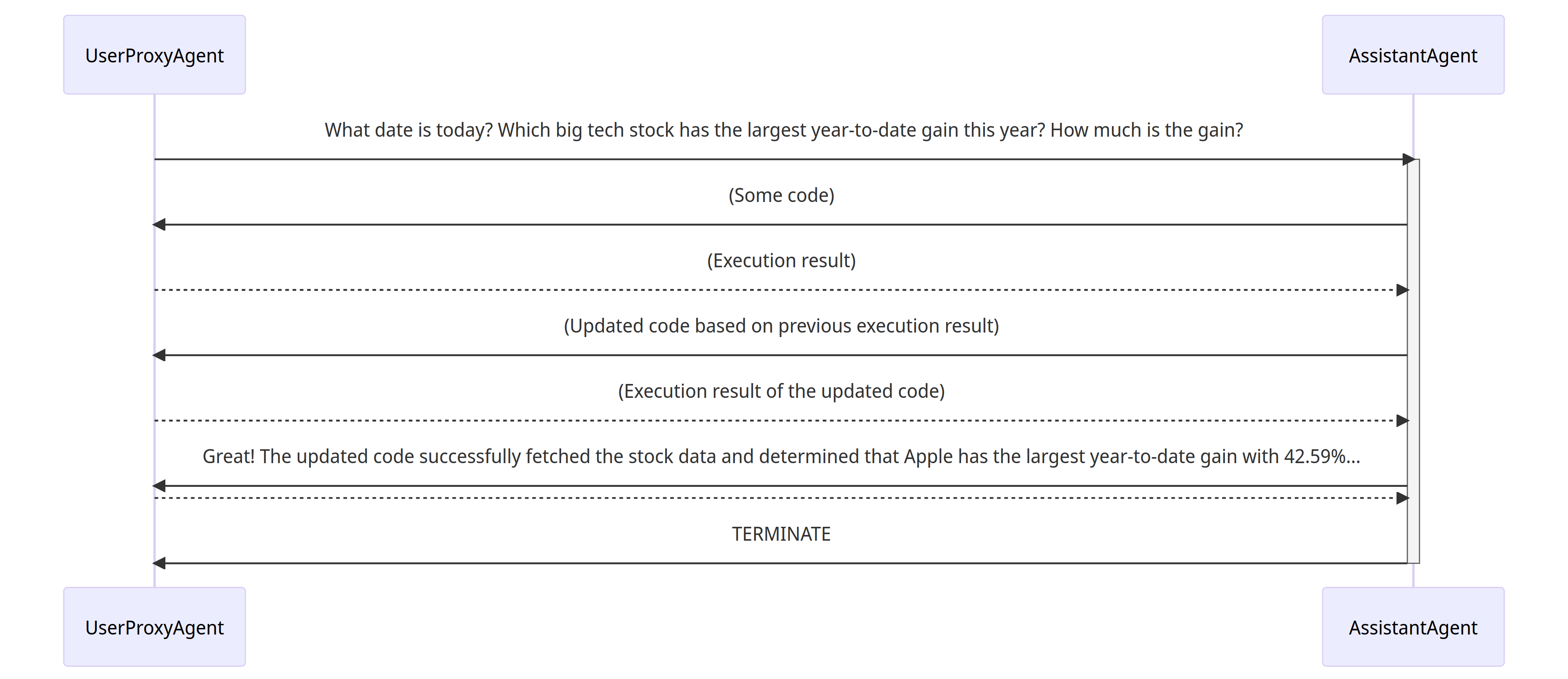
- The assistant receives a message from the user_proxy, which contains the task description.
- The assistant then tries to write Python code to solve the task and sends the response to the user_proxy.
- Once the user_proxy receives a response from the assistant, it tries to reply by either soliciting human input or preparing an automatically generated reply. If no human input is provided, the user_proxy executes the code and uses the result as the auto-reply.
- The assistant then generates a further response for the user_proxy. The user_proxy can then decide whether to terminate the conversation. If not, steps 3 and 4 are repeated.
Supporting Diverse Conversation Patterns
Conversations with different levels of autonomy, and human-involvement patterns
On the one hand, one can achieve fully autonomous conversations after an initialization step. On the other hand, AutoGen can be used to implement human-in-the-loop problem-solving by configuring human involvement levels and patterns (e.g., setting the human_input_mode to ALWAYS), as human involvement is expected and/or desired in many applications.
Static and dynamic conversations
By adopting the conversation-driven control with both programming language and natural language, AutoGen inherently allows dynamic conversation. Dynamic conversation allows the agent topology to change depending on the actual flow of conversation under different input problem instances, while the flow of a static conversation always follows a pre-defined topology. The dynamic conversation pattern is useful in complex applications where the patterns of interaction cannot be predetermined in advance. AutoGen provides two general approaches to achieving dynamic conversation:
- Registered auto-reply. With the pluggable auto-reply function, one can choose to invoke conversations with other agents depending on the content of the current message and context. A working system demonstrating this type of dynamic conversation can be found in this code example, demonstrating a dynamic group chat. In the system, we register an auto-reply function in the group chat manager, which lets LLM decide who the next speaker will be in a group chat setting.
- LLM-based function call. In this approach, LLM decides whether or not to call a particular function depending on the conversation status in each inference call. By messaging additional agents in the called functions, the LLM can drive dynamic multi-agent conversation. A working system showcasing this type of dynamic conversation can be found in the multi-user math problem solving scenario, where a student assistant would automatically resort to an expert using function calls.
This project welcomes and encourages all forms of contributions, including but not limited to:
- Pushing patches.
- Code review of pull requests.
- Documentation, examples and test cases.
- Readability improvement, e.g., improvement on docstr and comments.
- Community participation in issues, discussions, discord, and twitter.
- Tutorials, blog posts, talks that promote the project.
- Sharing application scenarios and/or related research.
Most contributions require you to agree to a Contributor License Agreement (CLA) declaring that you have the right to, and actually do, grant us the rights to use your contribution. For details, visit https://cla.opensource.microsoft.com.
If you are new to GitHub here is a detailed help source on getting involved with development on GitHub.
When you submit a pull request, a CLA bot will automatically determine whether you need to provide a CLA and decorate the PR appropriately (e.g., status check, comment). Simply follow the instructions provided by the bot. You will only need to do this once across all repos using our CLA.
This project has adopted the Microsoft Open Source Code of Conduct. For more information see the Code of Conduct FAQ or contact opencode@microsoft.com with any additional questions or comments.
How to make a good bug report
When you submit an issue to GitHub, please do your best to follow these guidelines! This will make it a lot easier to provide you with good feedback:
- The ideal bug report contains a short reproducible code snippet. This way anyone can try to reproduce the bug easily (see this for more details). If your snippet is longer than around 50 lines, please link to a gist or a GitHub repo.
- If an exception is raised, please provide the full traceback.
- Please include your operating system type and version number, as well as your Python, autogen, scikit-learn versions. The version of autogen can be found by running the following code snippet:
import autogen
print(autogen.__version__)
- Please ensure all code snippets and error messages are formatted in appropriate code blocks. See Creating and highlighting code blocks for more details.
Becoming a Reviewer
There is currently no formal reviewer solicitation process. Current reviewers identify reviewers from active contributors. If you are willing to become a reviewer, you are welcome to let us know on discord.
Guidance for Maintainers
General
- Be a member of the community and treat everyone as a member. Be inclusive.
- Help each other and encourage mutual help.
- Actively post and respond.
- Keep open communication.
Pull Requests
- For new PR, decide whether to close without review. If not, find the right reviewers. The default reviewer is microsoft/autogen. Ask users who can benefit from the PR to review it.
- For old PR, check the blocker: reviewer or PR creator. Try to unblock. Get additional help when needed.
- When requesting changes, make sure you can check back in time because it blocks merging.
- Make sure all the checks are passed.
- For changes that require running OpenAI tests, make sure the OpenAI tests pass too. Running these tests requires approval.
- In general, suggest small PRs instead of a giant PR.
- For documentation change, request snapshot of the compiled website, or compile by yourself to verify the format.
- For new contributors who have not signed the contributing agreement, remind them to sign before reviewing.
- For multiple PRs which may have conflict, coordinate them to figure out the right order.
- Pay special attention to:
- Breaking changes. Don’t make breaking changes unless necessary. Don’t merge to main until enough headsup is provided and a new release is ready.
- Test coverage decrease.
- Changes that may cause performance degradation. Do regression test when test suites are available.
- Discourage change to the core library when there is an alternative.
Issues and Discussions
- For new issues, write a reply, apply a label if relevant. Ask on discord when necessary. For roadmap issues, add to the roadmap project and encourage community discussion. Mention relevant experts when necessary.
- For old issues, provide an update or close. Ask on discord when necessary. Encourage PR creation when relevant.
- Use “good first issue” for easy fix suitable for first-time contributors.
- Use “task list” for issues that require multiple PRs.
- For discussions, create an issue when relevant. Discuss on discord when appropriate.
Developing
Setup
git clone https://github.com/microsoft/autogen.git
pip install -e autogen
Docker
We provide Dockerfiles for developers to use.
Use the following command line to build and run a docker image.
docker build -f samples/dockers/Dockerfile.dev -t autogen_dev_img https://github.com/microsoft/autogen.git#main

docker run -it autogen_dev_img
Detailed instructions can be found here.
Develop in Remote Container
If you use vscode, you can open the autogen folder in a Container. We have provided the configuration in devcontainer. They can be used in GitHub codespace too. Developing AutoGen in dev containers is recommended.
Pre-commit
Run pre-commit install to install pre-commit into your git hooks. Before you commit, run pre-commit run to check if you meet the pre-commit requirements. If you use Windows (without WSL) and can’t commit after installing pre-commit, you can run pre-commit uninstall to uninstall the hook. In WSL or Linux this is supposed to work.
Write tests
Tests are automatically run via GitHub actions. There are two workflows:
The first workflow is required to pass for all PRs (and it doesn’t do any OpenAI calls). The second workflow is required for changes that affect the OpenAI tests (and does actually call LLM). The second workflow requires approval to run. When writing tests that require OpenAI calls, please use pytest.mark.skipif to make them run in only when openai package is installed. If additional dependency for this test is required, install the dependency in the corresponding python version in openai.yml.
Run non-OpenAI tests
To run the subset of the tests not depending on openai (and not calling LLMs)):
- Install pytest:
pip install pytest
- Run the tests from the
testfolder using the--skip-openaiflag.
pytest test --skip-openai
- Make sure all tests pass, this is required for build.yml checks to pass
Coverage
Any code you commit should not decrease coverage. To run all unit tests, install the [test] option:
pip install -e."[test]"
coverage run -m pytest test
Then you can see the coverage report by coverage report -m or coverage html.
Documentation
To build and test documentation locally, install Node.js. For example,
nvm install --lts
Then:
npm install --global yarn  # skip if you use the dev container we provided
pip install pydoc-markdown  # skip if you use the dev container we provided
cd website
yarn install --frozen-lockfile --ignore-engines
pydoc-markdown
yarn start
The last command starts a local development server and opens up a browser window. Most changes are reflected live without having to restart the server.
