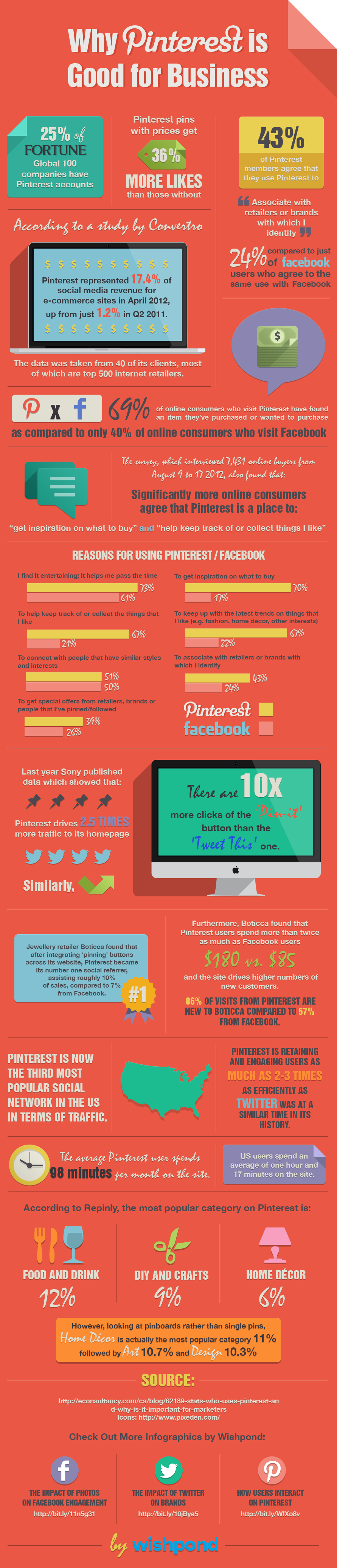
Pinterest is one of the biggest social media platforms, with over 150 million users.
Statistics reveal that the social network has many female users (71%). However, the number of men on Pinterest has doubled in the last few years, showing the growth potential that it holds.
Like any other social network, businesses can use Pinterest to promote their products or services. Users spend hours going through the social network, giving marketers a chance to reach them. 70% of users check Pinterest for tips or information on what they wish to buy.[1] The number is a lot higher when compared to other social media networks, such as Facebook, where only 17% of users browse the platform with a purchase in mind.
Pinterest users also tend to spend more than Facebook users ($165 vs. $95), leaving no reason for businesses not to give Pinterest a try. So how can one make good use of this colorful platform? Here are some tips:
1. Set Up an Impressive Profile
It all starts with your profile. This is generally the first thing users will see when they visit your business page. To market on Pinterest properly, you must look professional and come across as a serious contender.
Also, link your account to your Pinterest page and see what is getting the most pins. This will help you understand what gets more likes and what doesn’t. Concentrate on rich pins to get better results and develop a Pinterest marketing strategy[2] that works. Moreover, design your boards neatly and follow a specific pattern. Give proper and keyword-friendly names to your panels, and change their position based on season or relevancy. Lastly, keep your profile public to make it accessible to one and all.
2. SEO Matters Even Here
Since most of us are used to making random posts on Twitter and Instagram with #hashtags, we tend to neglect how robust search engine optimization can be when using social media networks. Pinterest is one network where keywords are of colossal importance.
The basic idea is the same as on any other website. It would help if you found keywords that are relevant to your post and used them correctly. The idea is simple: you will need keywords to help people find you on Pinterest when they search for a relevant item on search engines.
Other than this, keep your setting public and have your page open to search engines. If you fail to do so, your posts will not be visible to everyone, and you will lose potential visibility, which kills the purpose. After all, the more people see what you post, the more sales you can make. And remember that, on average, around 50% of internet traffic[3]comes through search engines, and you do not wish to lose on this traffic.
To make your profile visible to search engines, you need to disable ‘Search Privacy.’ While Pinterest’s search engine can still find you without this option, you will not be visible on Google and other search engines if you have search privacy.
To turn it off, log in and go to your account settings. Now find the ‘Search Privacy’ setting and choose the option ‘No’ to make your pins visible to search engines.
3. Put Up Quality Pictures
Pinterest is all about photos, and you need to produce good quality photos to get attention; over 5 million pins are shared[4] in a day on Pinterest. A few common points among the most shared images are:
- Big images tend to get more shares on Pinterest. A minimum of 600 X Infinite is the recommended size. To be safe, you may use a tool like Canva, which comes with a readymade Pinterest tool to create customized images.
- Post infographics, as they tend to get more attention on Pinterest. A claim is justified with a fact that tends to get more likes.
- Use a good camera to click photos. Since Pinterest is all about images, pictures with good quality angles and excellent use of filters tend to get more attention.
4. Socialize a Little
It is essential to socialize on Pinterest if you wish to make it big. Not only should you be active and make regular posts, but you should also make it a point to communicate with other users and respond to comments.
In addition to this, make good use of influencers. You can do so, too, by following them and commenting on their posts. Since it is a social network, you need to be a little social to stay relevant.
Pinterest can help you make more money simply by being active and promoting your business. However, remember that there may be a time lag, and you will need to put in some effort and time to understand what works and doesn’t work for your business. Keep your eye on the latest stats and make changes as necessary, and you will begin to see positive results.
| [1] | ^ | Wishpond Pinterest Infographic: http://corp.wishpond.com/wp-content/uploads/2013/06/Infographic_pinterest.png |
| [2] | ^ | Pinterest marketing strategy: https://www.yotpo.com/blog/pinterest-marketing-strategy/ |
| [3] | ^ | Search engine optimization: http://searchengineland.com/study-organic-search-drives-51-traffic-social-5-202063 |
| [4] | ^ | Internet infographic: http://socialtimes.com/one-minute-internet-infographic_b147855 |